HubSpot

Which HubSpot Migration Services Support Enterprise Rebrands and New Go-to-Market?

15 min read
Which HubSpot Migration Services Support Enterprise Rebrands and New Go-to-Market?

A HubSpot migration that supports an enterprise rebrand and a new go-to-market spans six service types: website and content replatforming, CRM and data migration, automation and workflow rebuild, system integration, portal consolidation with business units, and post-migration adoption.

A rebrand is one of the few moments a company rebuilds itself in public. New name, new positioning, new audience, often a new pricing model and a new sales motion to go with it.

It's all very exciting, but the pressure and demand for a smooth transition is always profound. After all, only 12% of businesses experience a successful business transformation (Bain & Company, 2024).

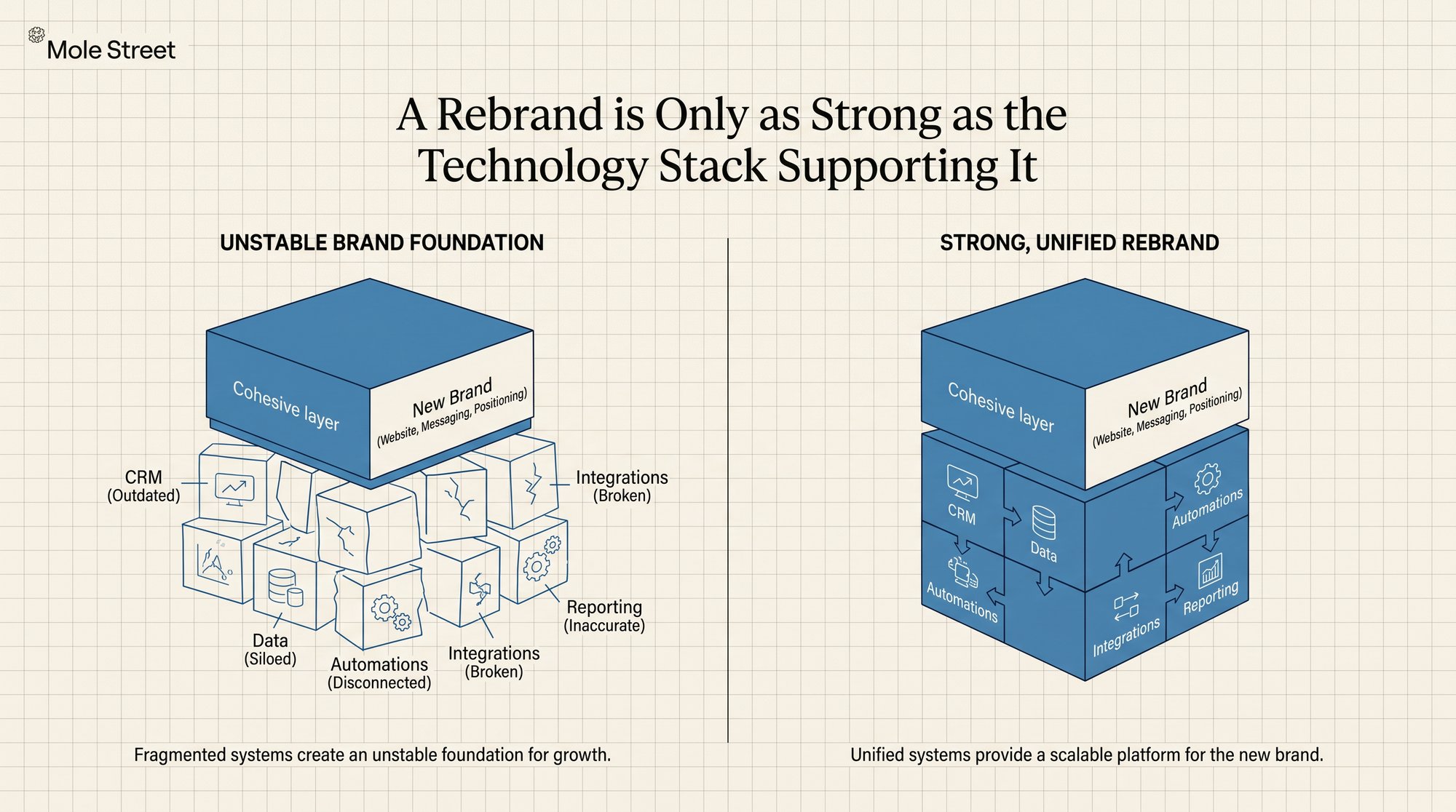
In the context of CRMs, it's easy to see how a rebrand slides into that 88%.If you revamp the website without updating the CRM, the new brand goes live on top of the old company's operations. Leads still route by the old territories.

Lifecycle stages still describe the sales motion you just replaced. Reports still track the segments you no longer sell to, and your automated emails still go out in the old brand's voice.

Getting this right comes down to three things.

In this blog, you'll discover:

  • The full scope of a rebrand migration: the six services it actually requires, and the ones most teams skip until it costs them
  • The mistake that strands your revenue team: why a website-only rebrand breaks your operations on launch day
  • How to vet a migration partner: the exact checklist that surfaces the gaps before you sign, not halfway through the project
Create_a_Mole_Street-style_tho_Nano_Banana_2_38788

What Does an Enterprise Rebrand Actually Require From a HubSpot Migration?

An enterprise rebrand requires a HubSpot migration that rebuilds your brand-facing assets and your revenue operations in parallel, not a website transition handled on its own. That work splits into six service types, and a rebrand with a new go-to-market usually touches all of them.

In plain terms, here is what each one does:

  • Website and content replatforming: rebuild your website and content under the new brand
  • CRM and data migration: move your customer data across and clean it up on the way
  • Automation and workflow rebuild: redo the behind-the-scenes processes, like who gets each lead and which emails go out
  • System integration: connect HubSpot to your other tools so everything shares the same data
  • Portal consolidation with Business Units: if you've merged brands, run them all in one place without mixing them up
  • Post-migration adoption: make sure your team actually uses the new setup

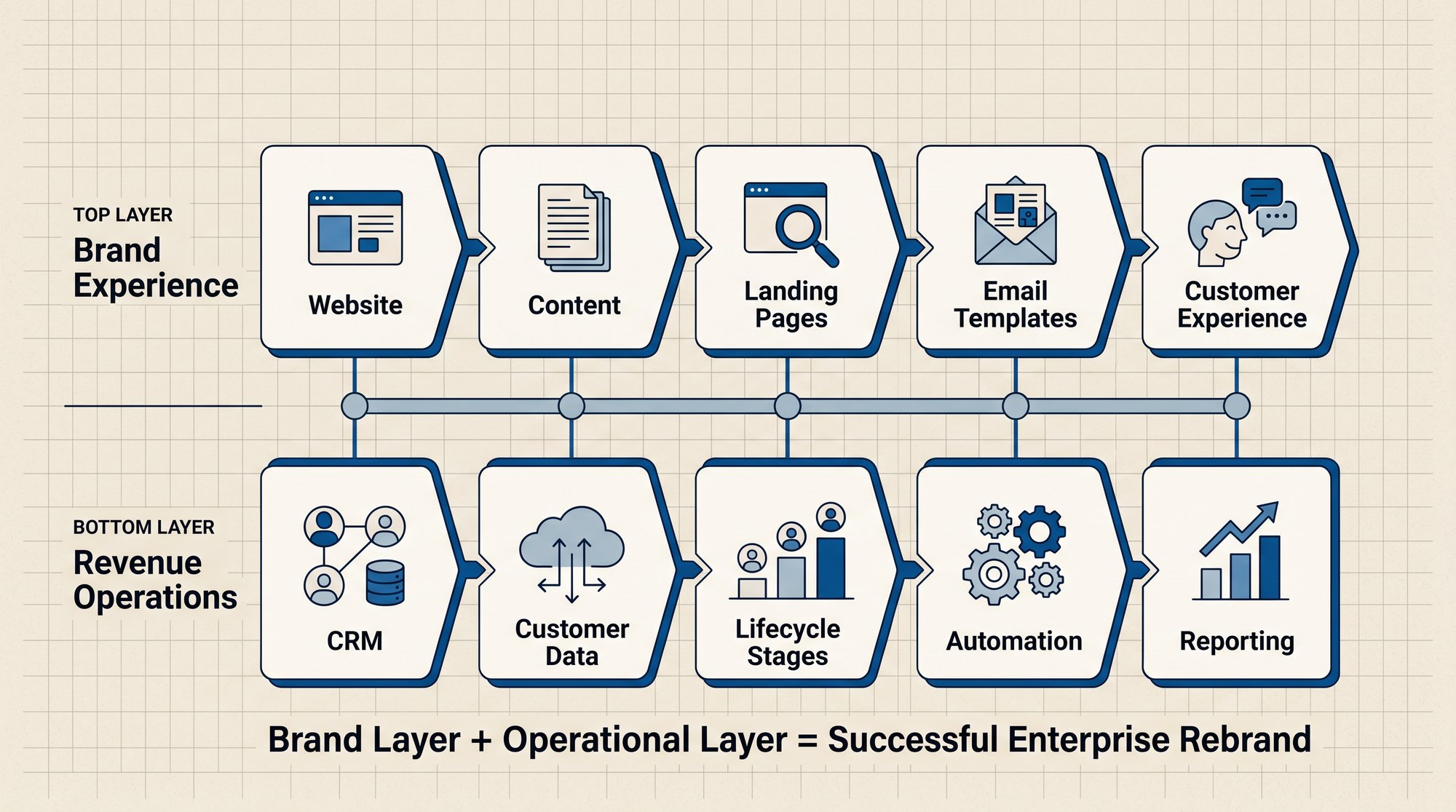
There’s a lot of heavy lifting in a rebrand and go-to-market motion because you have to focus on two layers of the business at once.

The outward layer is everything a buyer sees: the website, web experiences, email templates, landing pages, and content. And the operational layer is everything your revenue team runs on: data, lifecycle stages, pipelines, automations, and reports.

Both layers have to be rebuilt together, because the moment one moves without the other, the gaps appear. Consider a prospect who lands on your rebranded site and fills in the form, only to be routed to a rep who no longer covers their segment, filed under a pipeline stage you retired months ago, and followed up by an automated email still written in the old brand's voice.

The reverse is just as damaging, since fixing the CRM while the website and emails still carry the old identity means your new positioning never reaches the buyer at all.

Create_a_Mole_Street-style_tho_Nano_Banana_2_37589

How Does Website and Content Replatforming Support a Rebrand?

Website and content replatforming rebuilds your site, content, and design on HubSpot's Content Hub under the new brand, while preserving the URL structure and SEO equity that took years to earn. For a rebrand, this is the part buyers see first.

HubSpot's own replatforming service moves content onto a new theme, but it stops at the technical transition. It does not redesign your messaging, build significant custom development, or rethink your content strategy for a new audience. A rebrand needs all three.

The replatform covers the visible assets:

  • Web experiences and templates rebuilt on the new brand system
  • Landing pages recreated for the new go-to-market campaigns
  • URL mapping and redirects so search rankings survive the cutover
  • Content strategy reworked for the audience the rebrand is targeting

The two biggest risks sit here. Lose the redirects and you lose the organic traffic the old brand built. Skip the content strategy and the new site sells to the company you used to be.

What Happens to the CRM and Data During a Brand Transition?

During a brand transition, CRM and data migration moves your contacts, companies, and deal history into HubSpot, then redesigns the data model to fit the new go-to-market rather than the old one. It is the highest-stakes part of the whole project.

Most migrations come undone well before the import step, when teams plan to clean the data during the move instead of before it.

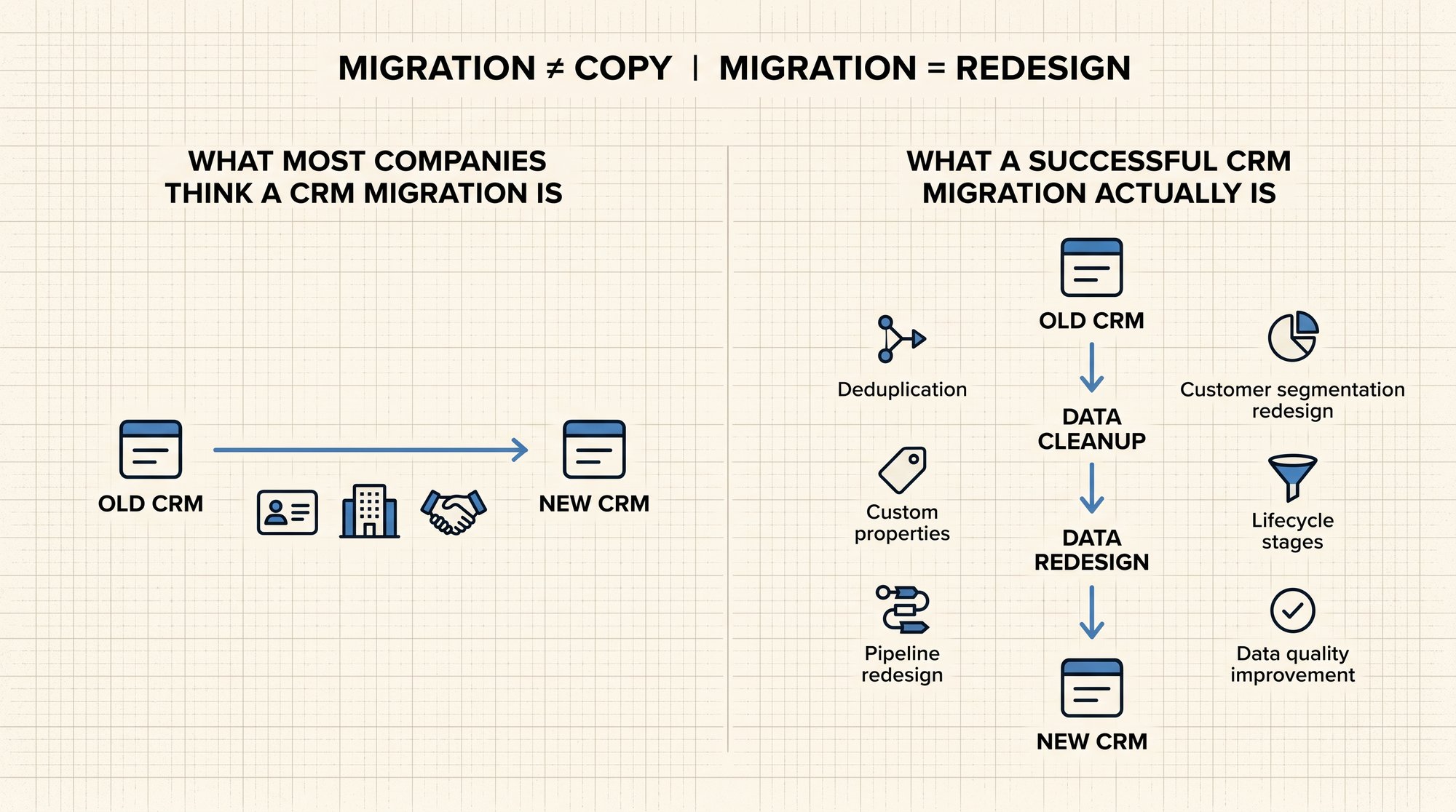
A new go-to-market makes the data model itself the problem. The segmentation that worked for your old audience no longer maps to the new one. Lifecycle stages defined for the old sales motion no longer describe how deals actually progress.

So the migration is not a copy of old records into a new system. It is a redesign: deduplicated data, custom properties that tag every contact and company to the new model, and pipelines rebuilt to reflect the motion you are moving toward, including complex, multi-stage sales pipelines.

The migration is the one chance to fix the data structure before the new system makes it permanent.

Create_a_Mole_Street-style_tho_Nano_Banana_2_96226

How Do Automation and Workflows Get Rebuilt for a New Go-to-Market?

The automation and workflow rebuild recreates your behind-the-scenes processes in HubSpot. This includes lead routing, nurture sequences, internal notifications, and reporting. The point is to make them match your new sales motion, not the old one.

This is the work that separates a real migration partner from a basic data transfer. Instead of copying your old automations across, they rebuild each one for how you sell now.

In practice, that means:

  • Workflows that route leads by the new segments and territories
  • Email templates and sequences rebuilt for the new positioning
  • Reports and dashboards that measure the new motion, not the retired one
  • Internal notifications that match the new team structure

A rebrand without this work produces a contradiction. The website says one thing about who you are, while the automation behind it still runs like the old company. Buyers feel the gap immediately.

How Does Integration Align HubSpot With the Rest of the Tech Stack?

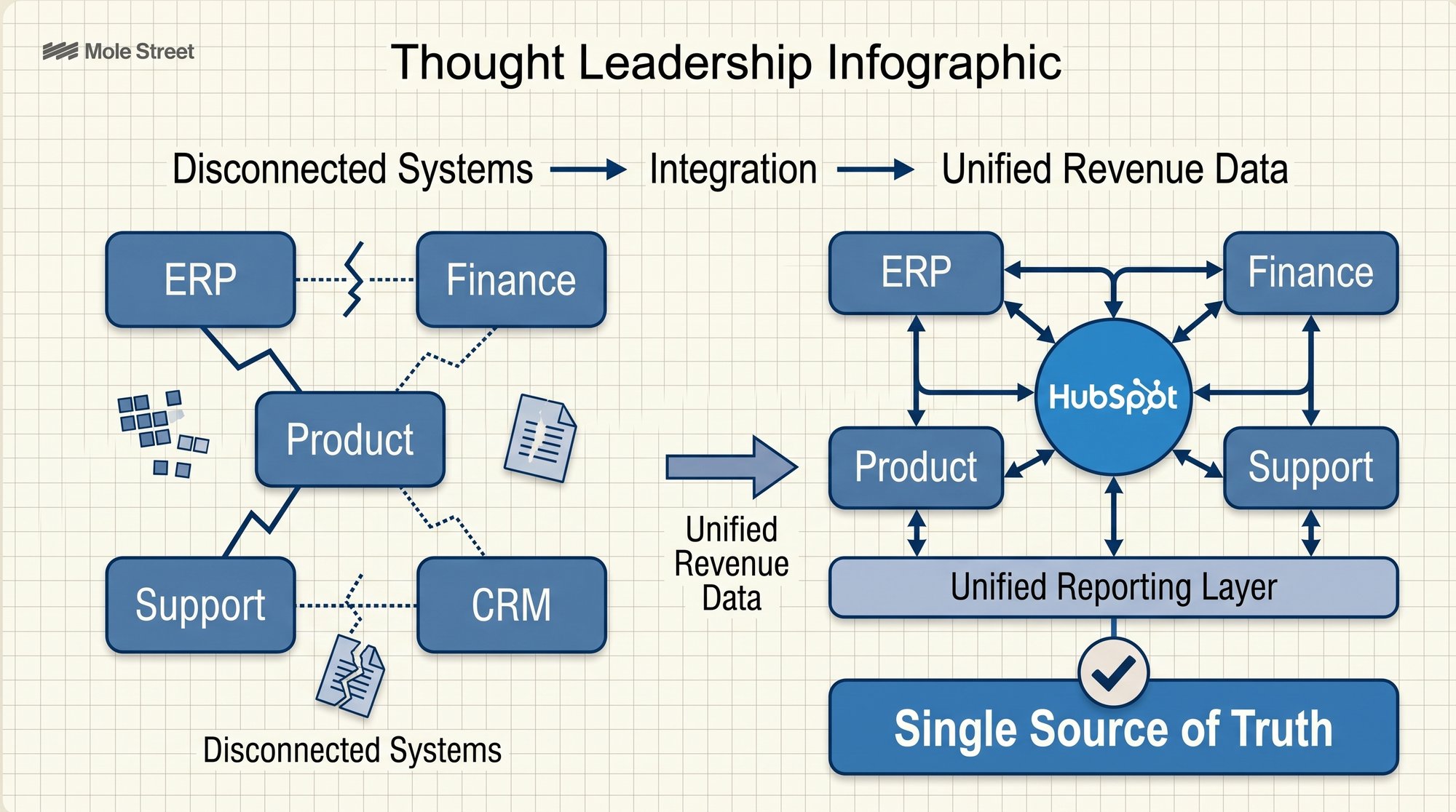
System integration connects HubSpot to your ERP, finance, product, and support systems so the rebrand produces one source of truth instead of another disconnected tool. A new go-to-market is the right moment to simplify the stack, not add to it.

Interestingly, most enterprises are already running on disconnected tools. The average organization now uses around 897 applications, and fewer than a third of them are connected to one another (MuleSoft 2025 Connectivity Benchmark). The rest sit in separate systems, which is exactly why reporting becomes unreliable. A rebrand is the trigger that justifies consolidating them.

What's more, integrating during the migration keeps HubSpot in sync with the other systems that hold your revenue data, so information flows both ways automatically. Finance, product usage, support tickets, and CRM activity all feed into one reporting layer.

As a result, you get a single, trustworthy view of your revenue, instead of a new brand running on the same disconnected tools as before. This is the same foundation behind aligning marketing, sales, and service data across one platform.

Create_a_Mole_Street-style_tho_Nano_Banana_2_98636

Can One HubSpot Portal Run Multiple Brands After a Rebrand?

Yes. One HubSpot portal can run multiple brands using Business Units and portal partitioning, which assign scoped visibility, separate brand assets, and clean segmentation to each entity while keeping shared reporting. This is the core of any rebrand that follows a merger or an acquisition.

When a rebrand consolidates two companies into one, or restructures several brands under a parent, the migration has to support more than a single identity. Portal consolidation and merge services handle exactly this: combining instances, partitioning one portal across entities, and maintaining brand-specific assets without losing a unified view of the whole.

The requirements for a multi-brand rollout are specific:

  • Scoped per-entity visibility so each brand sees its own data
  • Shared reporting so leadership sees across all of them
  • Custom objects that model parent-child and multi-engagement relationships
  • A defined cross-sell access group so revenue moves between brands without exposing everything to everyone

This is structural work. It is the difference between several brands operating cleanly inside one system and a consolidation that creates new confusion on day one.

What Happens After the Migration Goes Live?

Adoption is what makes or breaks a migration after launch. A migration can be technically flawless and still fail if the revenue team reverts to old habits, works around the new pipelines, or distrusts the new reports.

Post-migration support closes that gap with validation checks, documentation, and training tied directly to the new go-to-market.

Teams learn the system as part of how they now sell, so it makes sense from day one. That is what turns a completed migration into a system people actually use. For a step-by-step approach, see our guide on how to drive CRM adoption across marketing and sales (for banks).

How Do You Choose a HubSpot Migration Partner for a Brand Transition?

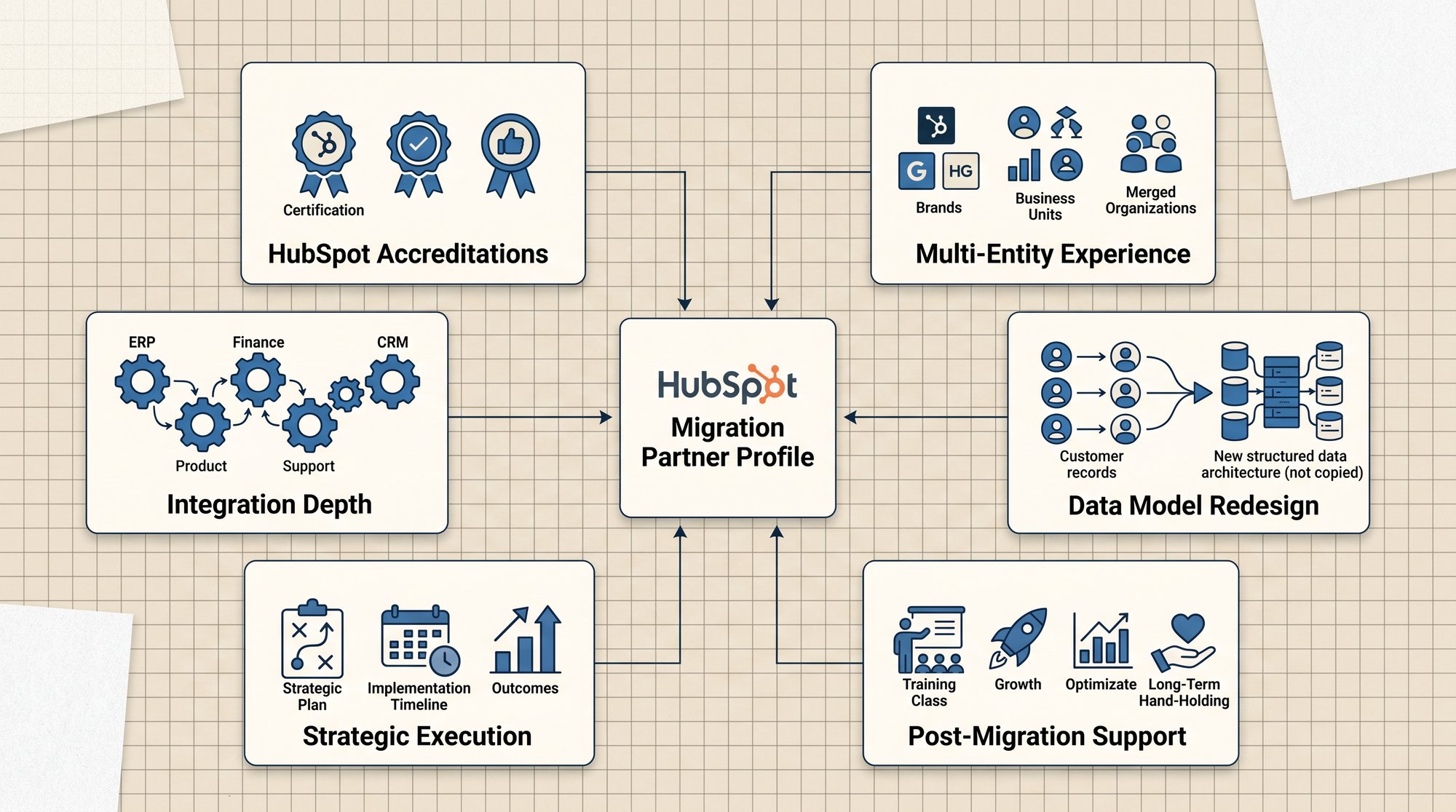
The best way to choose a HubSpot migration partner for a brand transition is to first check their HubSpot accreditations, multi-entity experience, integration depth, and proof of strategic execution.

This is the best way to measure your candidate since you’ll be taking both their experience and credentials into consideration. Use this checklist as part of your evaluation process:

  • HubSpot accreditations, specifically Data Migration and Custom Integration, which signal verified capability on the work a brand transition demands
  • Multi-entity and portal consolidation experience if the rebrand involves a merger or several brands
  • Integration depth across ERP, finance, product, and support systems
  • Data model redesign, not record transfer, so the new go-to-market is reflected in the structure
  • Proof of strategic execution, meaning real case studies that show the brand and operational layers rebuilt together
  • Post-migration adoption support, because the failure rate lives after go-live
Create_a_Mole_Street-style_tho_Nano_Banana_2_82937

How Does Mole Street Approach Enterprise Brand Transitions?

Mole Street approaches enterprise brand transitions as one coordinated project, rebuilding brand-facing assets and revenue operations together. As an Elite HubSpot Solutions Partner with deep experience in complex, multi-entity architecture, Mole Street treats the rebrand and migration as a single project.

This is advantageous to you as the client because it allows you to:

  • Cut the cost of the rebrand: running it as one project means you never pay to build the same assets twice
  • Protect the launch: brand and operations go live together, so a lagging CRM can't undermine the new brand
  • Get a return faster: operations launch with the brand, so the rebrand starts generating value from day one
  • Trust your numbers immediately: one team builds the brand and the data together, so reporting is accurate the moment you launch

Mole Street Migrations

The Mole Street team has run enterprise migrations with hundreds of thousands of records and multiple business units, and brought each one onto HubSpot cleanly:

  • Enterprise-scale migration with 900,000+ records: A U.S. medical device manufacturer consolidated four business units into a single HubSpot portal while maintaining full data integrity and uninterrupted operations.
  • Unified customer data across multiple systems: Sax LLP consolidated three-plus systems into a single source of truth, bringing together 25,000+ contacts and 1,100+ deals with automated data hygiene.
  • Organization-wide CRM standardization: Yellowstone Landscape migrated data across 55 branches and enabled 120 users on a consistent CRM framework built for long-term adoption.

The Rebrand Is the One Chance to Rebuild the System Underneath It

A rebrand and a new go-to-market force a decision most companies put off for years. The brand work has to happen, and it drags the operational layer into the open with it. You can replatform the website and leave the CRM as it was, or you can rebuild both while the budget and the mandate are there.

The companies that get this right treat the migration as the moment to fix the structure, not just refresh the surface. New brand, new motion, new system, built together.

And what does this lead to? A launch that holds. Reporting leadership can trust. And a HubSpot platform that finally matches the company you are becoming instead of the one you left behind.


Your Tech Stack Will Determine the Success of Your Rebrand and Go-to-Market

We’re in the midst of the digital and AI era, where businesses rely on the most niche tools to carry out simple tasks that keep the business running. For context, on average, marketers will use more than 12 different tools, with many leveraging more than 31 tools to manage campaigns and data (HubSpot, 2025).

Every one of those tools holds a piece of your customer data and your processes. That is the system your rebrand and new go-to-market will actually run on. Relaunch the brand but leave that stack untouched, and the new brand goes live on an old, broken setup. Leads route by the old rules, reporting can't be trusted, and the new positioning never converts the way it should.

The smarter move is to fix the tech stack while you have the budget and the mandate of a rebrand. Do this and, the day you launch, every lead reaches the right rep automatically, your reports show numbers leadership can actually trust, and the new positioning starts pulling in pipeline instead of stalling.

No months of cleanup, no rebuilding the same work twice, no explaining to the board why the rebrand hasn't shown up in the numbers.

Frequently Asked Questions

How long does an enterprise HubSpot migration for a rebrand take?

Most enterprise migrations tied to a rebrand run several months, depending on data complexity, the number of integrations, and whether multiple brands are being consolidated. The data audit and model design take longer than the import itself.

Do you need a partner with HubSpot Data Migration accreditation?

For a complex migration, yes. The accreditation signals verified capability on data structure, deduplication, and object mapping, which is where most migrations fail before go-live.

Can you migrate from Salesforce to HubSpot without losing pipeline history? Yes, when the migration is planned. Deal history, activity records, and pipeline stages can be mapped and preserved, but the mapping has to be designed before any data moves.

What is the difference between a HubSpot website migration and a full brand transition migration?

A website migration replatforms your content and design. A brand transition migration rebuilds the website plus the CRM data, automations, integrations, and reporting that the new go-to-market depends on.

Can one HubSpot portal support more than one brand after a merger?

Yes. Business Units and portal partitioning let several brands operate in one portal with separate assets and scoped visibility, while leadership keeps unified reporting across all of them.


Want to Take The First Step Forward to a Unified Tech Stack?