HubSpot

What To Look for in HubSpot Migration Services

16 min read
What To Look for in HubSpot Migration Services

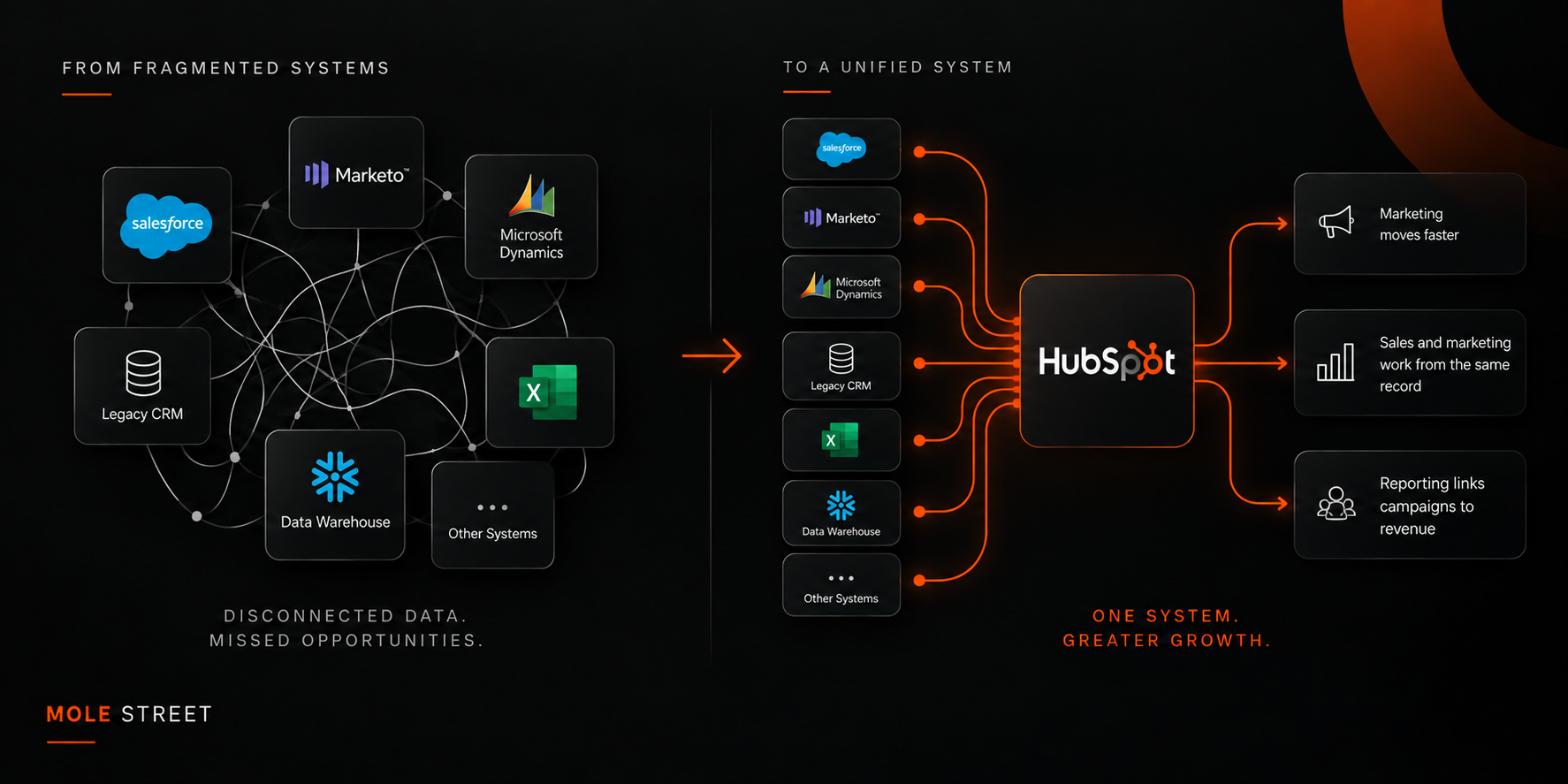
HubSpot migrations are sold on the promise that all your customer data will end up in one system. Done correctly, you get that and more, including marketing that can ship campaigns without waiting on ops, sales and marketing working from the same record, and reporting that links campaigns to revenue.

Done poorly, you get the opposite. Your reporting history does not come across, your attribution breaks, the systems you did not migrate stay disconnected, and your team works around the CRM rather than in it. The difference rarely depends on the software itself but rather on the service that runs the migration.

Most guides on this topic are checklists written for agencies or are ranked lists of vendors. Our guide is written for the buyer. Below are the criteria that separate a HubSpot migration service that can handle a complex enterprise stack from one that can only move a single system. We include what each scenario looks like when it’s done right and the red flags that tell you it isn’t.

Key Takeaways

  • The service, not the software, decides the outcome. A HubSpot migration either unifies your stack or recreates your silos on a new platform, and which outcome you get depends on who runs it.
  • Data integrity and reporting continuity are the criteria buyers forget. Losing historical records or attribution history is the most common and most expensive migration failure, and it isn’t discovered until months later.
  • Complex stacks need unification instead of a single-system move. In a multisystem enterprise environment, the provider must connect and reconcile systems, rather than load one system into HubSpot.
  • References at your scale are the real proof. The strongest migration services can show examples of completed migrations off your exact source platform, with the security posture to match.
ChatGPT Image Sep 14, 2026, 11_16_38 AM

What Should You Look for in HubSpot Migration Services?

Look for a service that can preserve your data and reporting, unify your full tech stack, run the migration with minimal disruption and back all three services with enterprise references. Those are the outcomes that matter, and we break them down into seven criteria:

  1. Can they migrate your data without losing history or integrity?
  2. Do they have real experience with your source platform?
  3. Can they unify a complex tech stack and not just move one system?
  4. What migration methodology do they use to minimize downtime?
  5. Will your reporting and attribution survive the move?
  6. Do they provide post-migration enablement and adoption?
  7. Can they demonstrate their credibility with enterprise references?

The rest of this article takes each one in turn.

1. Will a HubSpot Migration Lose Your Historical Data?

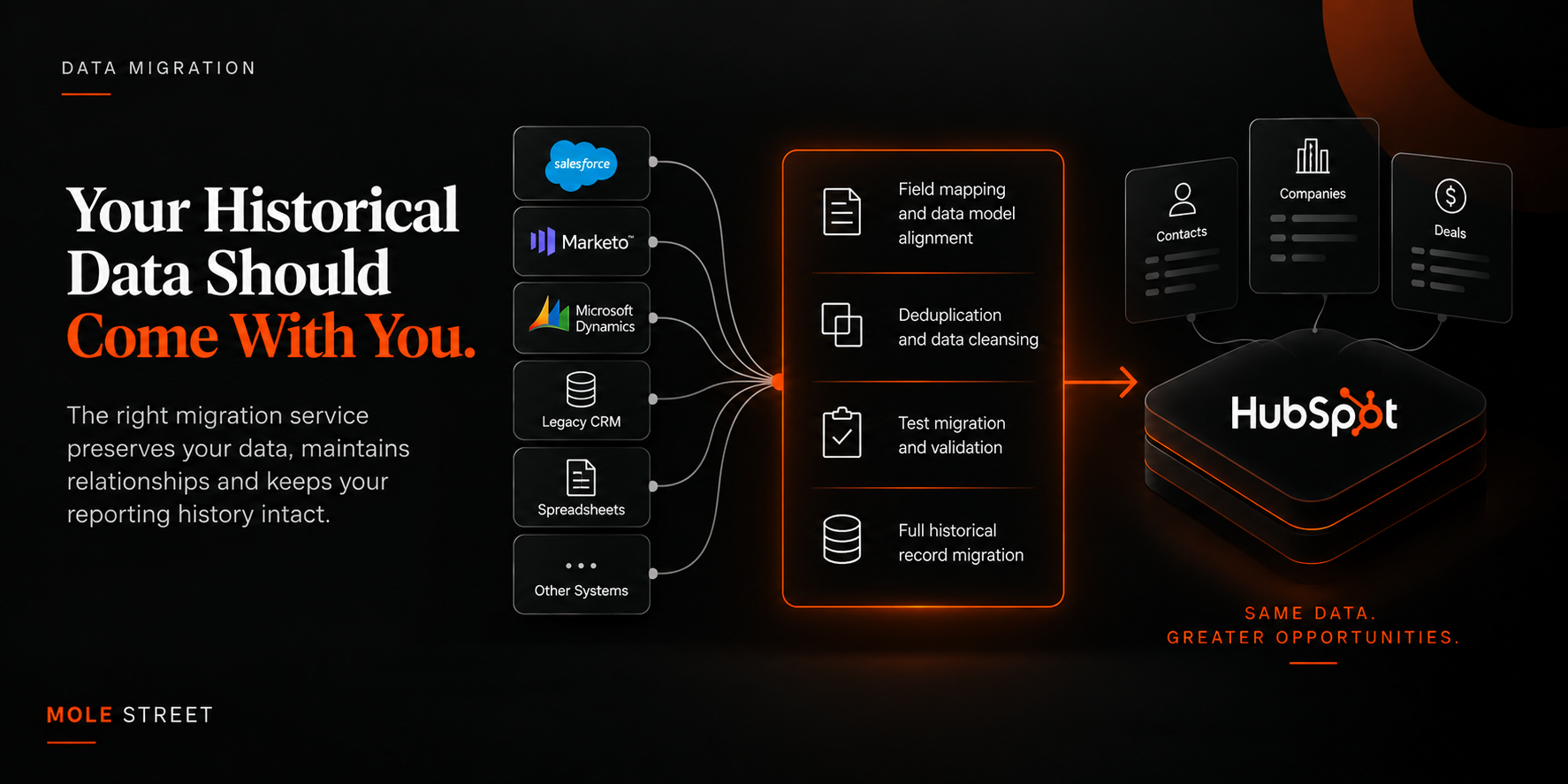
A HubSpot migration loses historical data when the service running it has no field-mapping plan, no deduplication process and no validation step, so confirm all three exist before you sign.

Data does not move cleanly between platforms because each one stores it differently. Records get duplicated, and custom fields get left behind. The associations between contacts and deals break when the mapping is wrong. Once that happens in production, it’s time-consuming and expensive to correct.

A good migration service provides a documented field-mapping plan, a deduplication process, a sandbox or test migration you can validate before go-live and an explicit plan for historical records, not just the active ones.

On one integration project at Mole Street, that validation layer stopped more than 30,000 duplicate records from reaching the client's CRM.

This is the same data-model work that decides whether two connected systems will agree, which we cover in detail in our guide to synchronizing CRM data.

The red flag: a provider who treats migration as a one-click export and import, with no validation step before you go live.

ChatGPT Image Sep 14, 2026, 11_20_23 AM

2. Why Does Source Platform Experience Matter When Migrating to HubSpot?

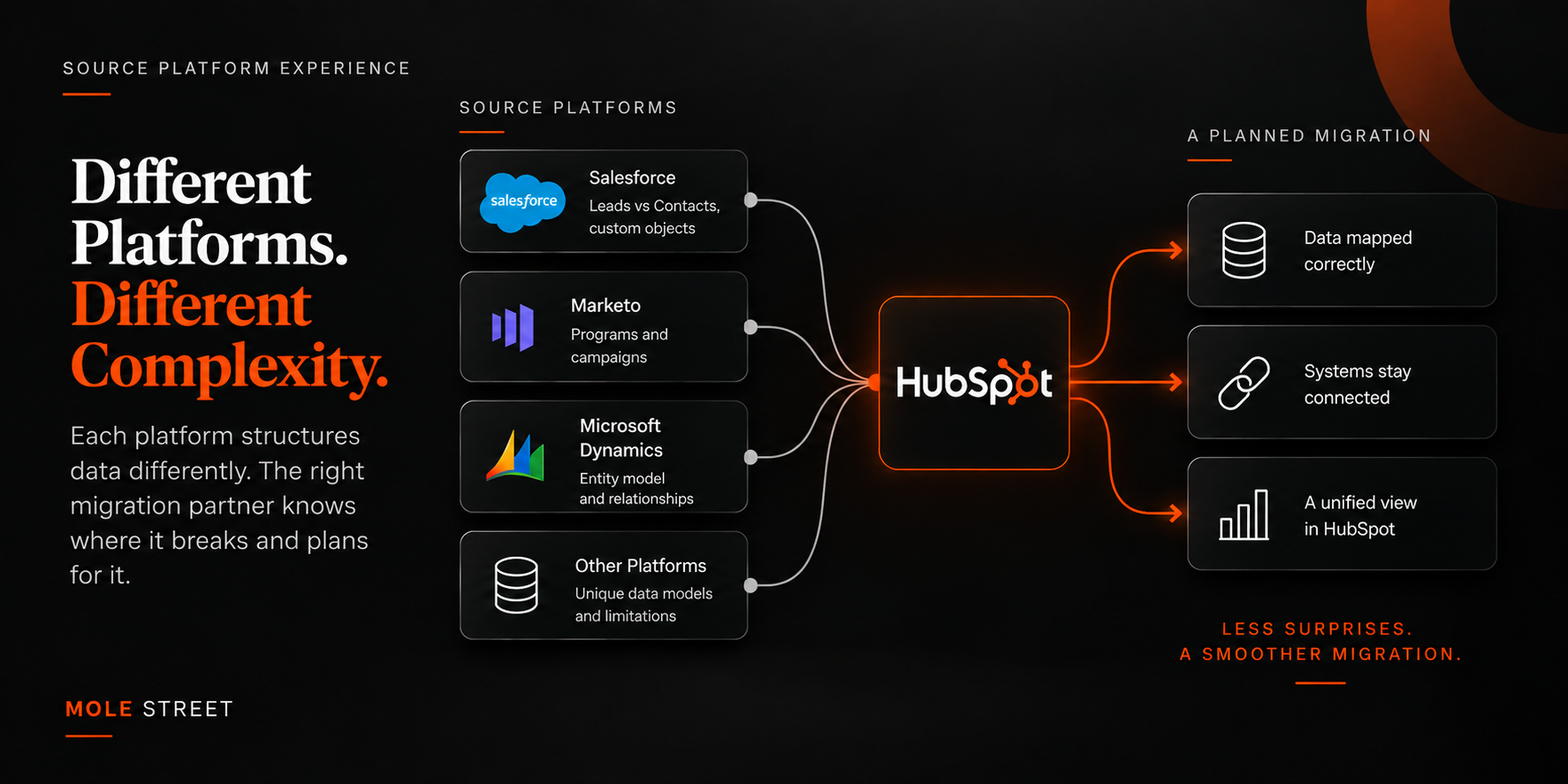
Source platform experience matters because a migration from Marketo looks nothing like a migration from Salesforce or Dynamics, and each one breaks in a different place. Each source platform models data in its own way.

Marketo is built around programs and campaigns, and Salesforce splits records into Leads and Contacts, while Dynamics uses its own entity model. A provider who has migrated off your specific platform knows where the data won’t map one-to-one. They’ll plan for this rather than discover it mid-project.

Ask each provider what breaks when moving off your specific platform. The answer should be immediate and specific. When Mole Street migrated Blue & Co., a 17-office accounting firm, off Microsoft Dynamics, reconciling data across offices was as complex as switching platforms. Moving ACT, Inc. off Marketo meant centralizing three million contacts while keeping Salesforce, On24 and Cvent connected. That's the level of specificity to look for.

The red flag: a generic "we migrate from anything" with no detail about how your source platform differs from HubSpot.

ChatGPT Image Sep 14, 2026, 11_21_43 AM

3. Can a HubSpot Migration Unify a Complex B2B Tech Stack?

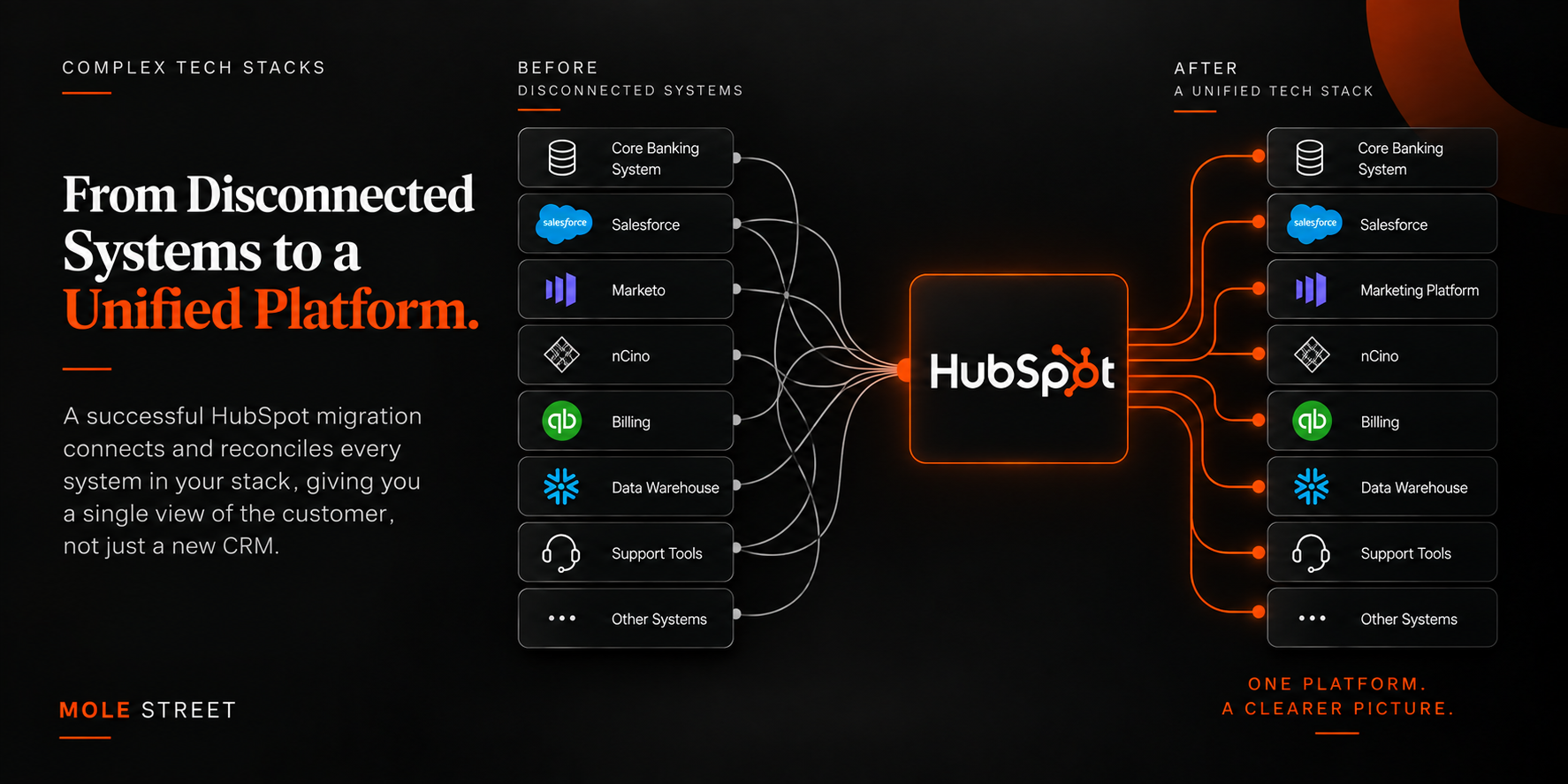
A HubSpot migration can unify a complex B2B tech stack, but only when the provider connects and reconciles every system in it rather than loading one system into HubSpot and leaving the rest alone.

A large B2B environment usually runs a CRM, a marketing platform, a data warehouse, a billing system and support tools. When you move one and ignore the rest, you still have every silo you started with, just on a newer platform. Unification means a plan for integrations, whether through Operations Hub, an iPaaS layer or custom objects, and a clear answer for how those systems stay in sync after go-live.

Without a map of every system during discovery, the integration plan gets written after the data has already moved, which is the expensive order to do it in. Pinnacle Bank ran customer data across more than 10 disconnected systems, including core banking, lending and treasury. Mole Street consolidated those into one platform with a single view of the customer rather than migrating a single tool.

The red flag: no integration plan beyond the one system being migrated.

ChatGPT Image Sep 14, 2026, 11_23_13 AM

4. How Do You Migrate to HubSpot Without Downtime?

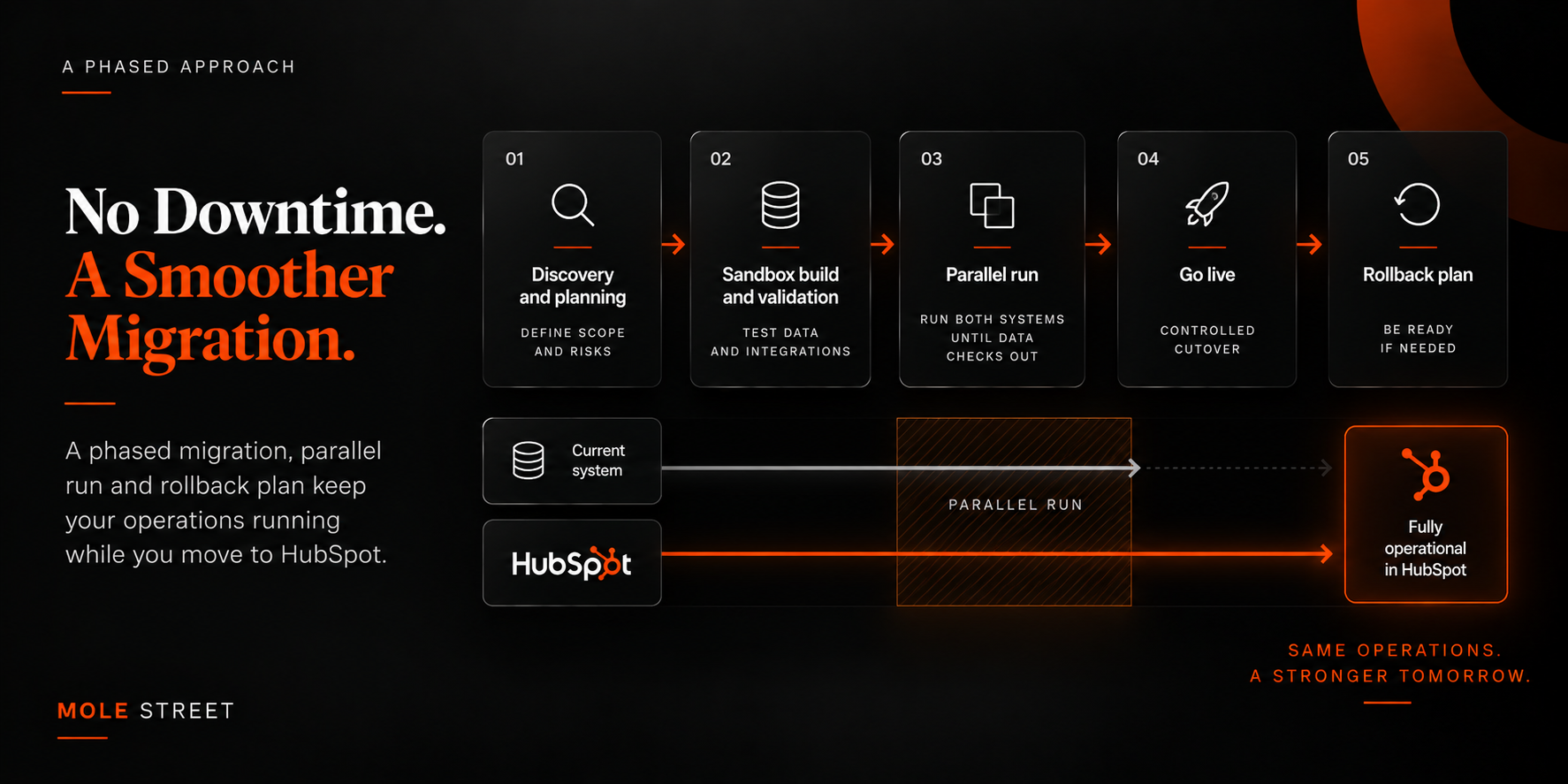
You avoid downtime with a phased migration, a parallel run of the old and new systems, and a documented rollback plan if validation fails. Go live in a single cutover with no fallback, and any problem on the day hits your live operations with nothing to revert to. Running both platforms side by side until the data checks out gives you a window to find errors while the old system is still doing the work.

Those three protections only work inside a sequence that is written down before anything moves. Discovery and a sandbox build come first, and a documented cutover plan governs go-live day itself.

The red flag: a fixed go-live date set before any discovery, with no phasing and no way back.

ChatGPT Image Sep 14, 2026, 11_24_58 AM

5. Does Your Reporting and Attribution Survive a HubSpot Migration?

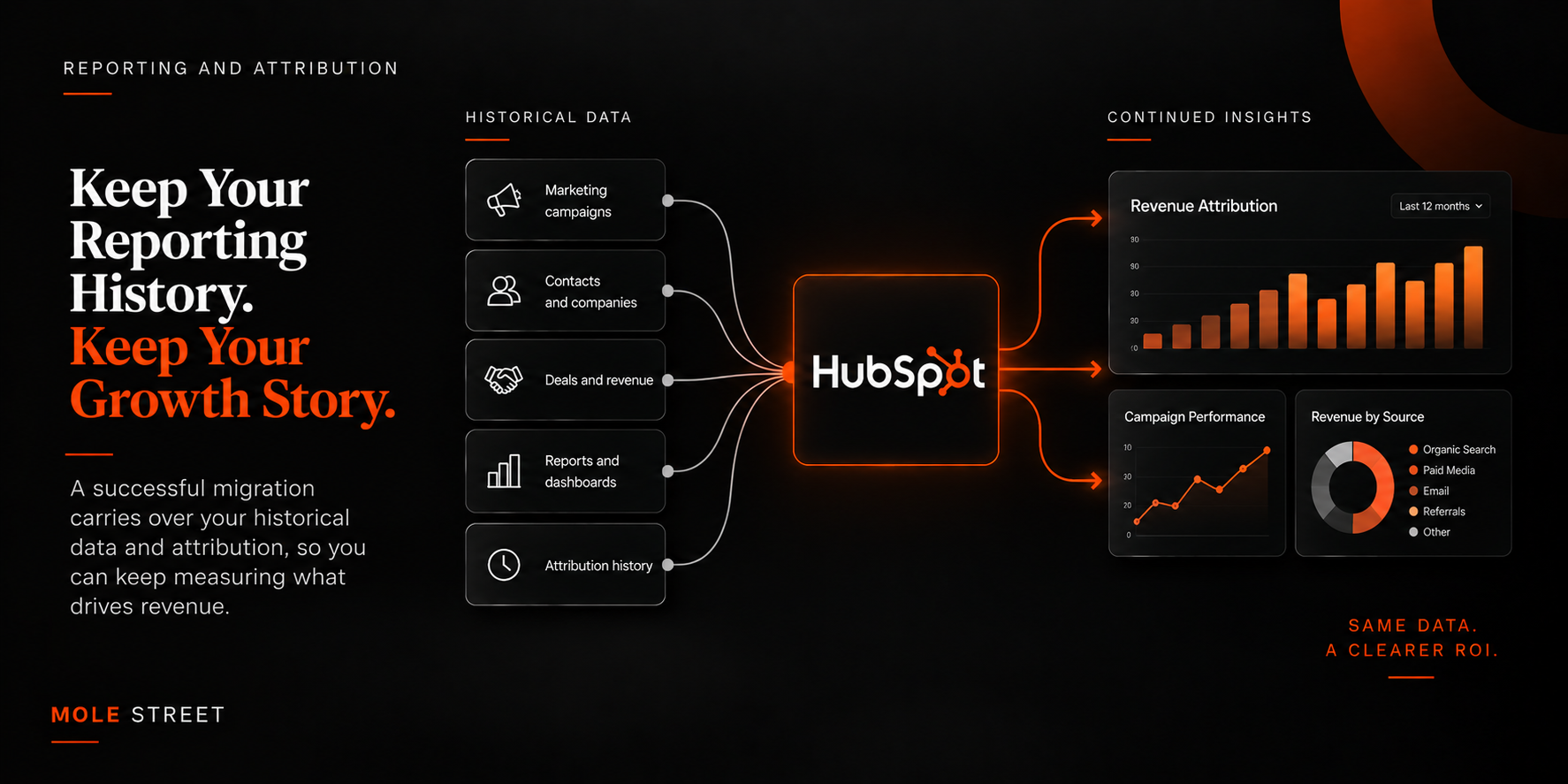
Reporting and attribution survive a HubSpot migration only when carrying them over is an explicit part of the scope, and this is the step buyers most often forget to ask about.

If historical data or the attribution mapping is lost, you lose year-over-year comparison and the ability to show which campaigns produced revenue. This is where a migration does the most lasting damage and is usually discovered months later when someone asks for a report that no longer reconciles.

Two decisions settle this. One is where the historical data lands, and the other is where attribution gets calculated after go-live. Both belong in the scope before mapping begins, whether that means making HubSpot the single source of truth for reporting or reconciling the data in a dedicated reporting layer.

For Weissman, a real estate law firm with 20 offices, it meant building a daily pipeline from the firm's closing system into HubSpot so that every closing credits the agent and office that produced it.

The red flag: no mention of reporting or attribution continuity in the proposal.

ChatGPT Image Sep 14, 2026, 11_26_25 AM

6. What Support Should You Get After a HubSpot Migration Goes Live?

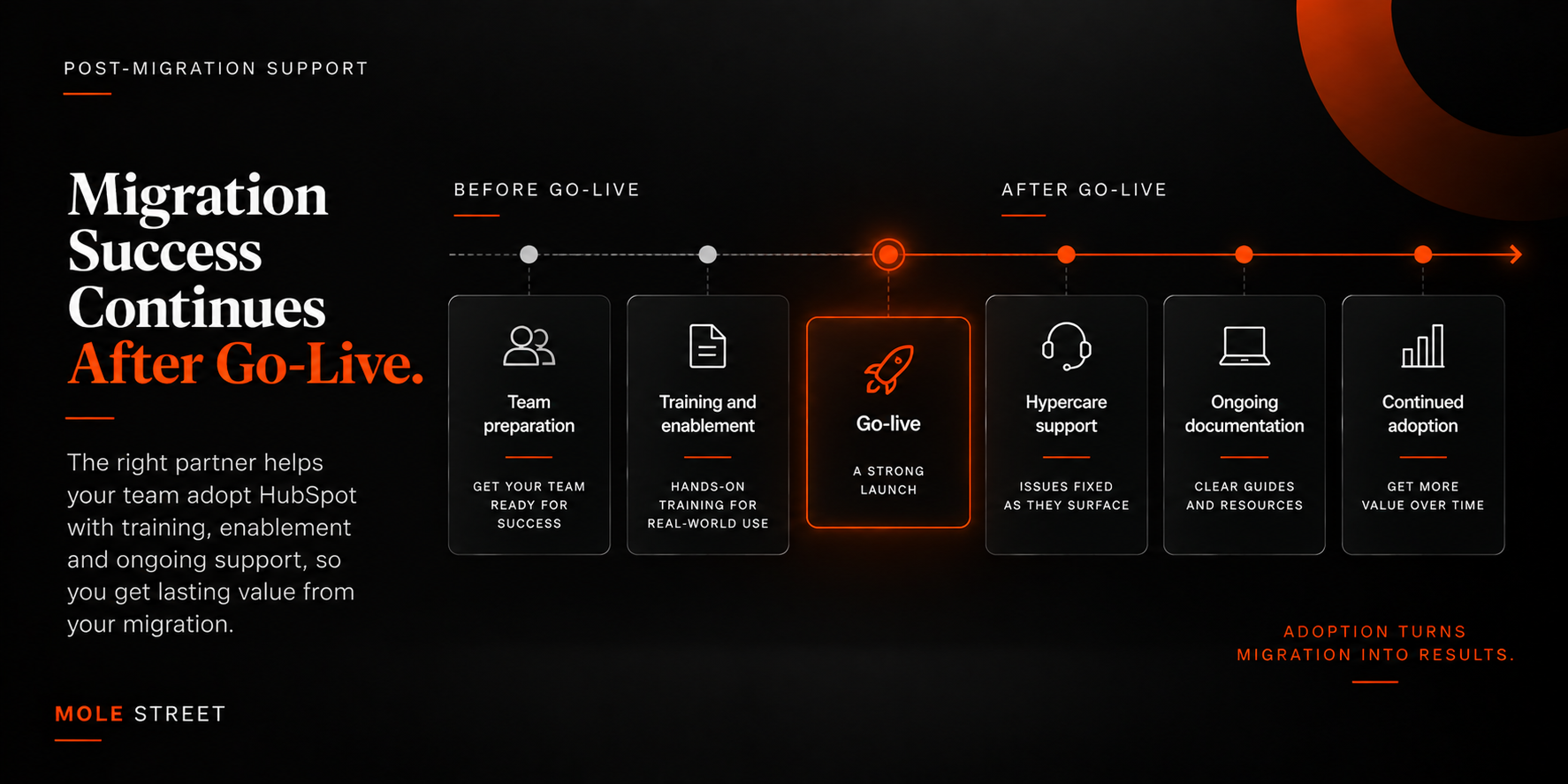
After go-live you should get hands-on training, admin enablement, written documentation and a hypercare period where issues get fixed as they surface.

A platform your team doesn’t use returns none of the value you paid for. The gap between a technically complete migration and a successful one is almost always adoption.

The most valuable part of that support starts before go-live, not after. A team that first sees the new system on the day they are told to use it will go back to the tools they already trust.

The red flag: a scope that ends the moment the data finishes loading.

ChatGPT Image Sep 14, 2026, 11_27_42 AM

7. How Do You Verify a Migration Partner's Enterprise Experience?

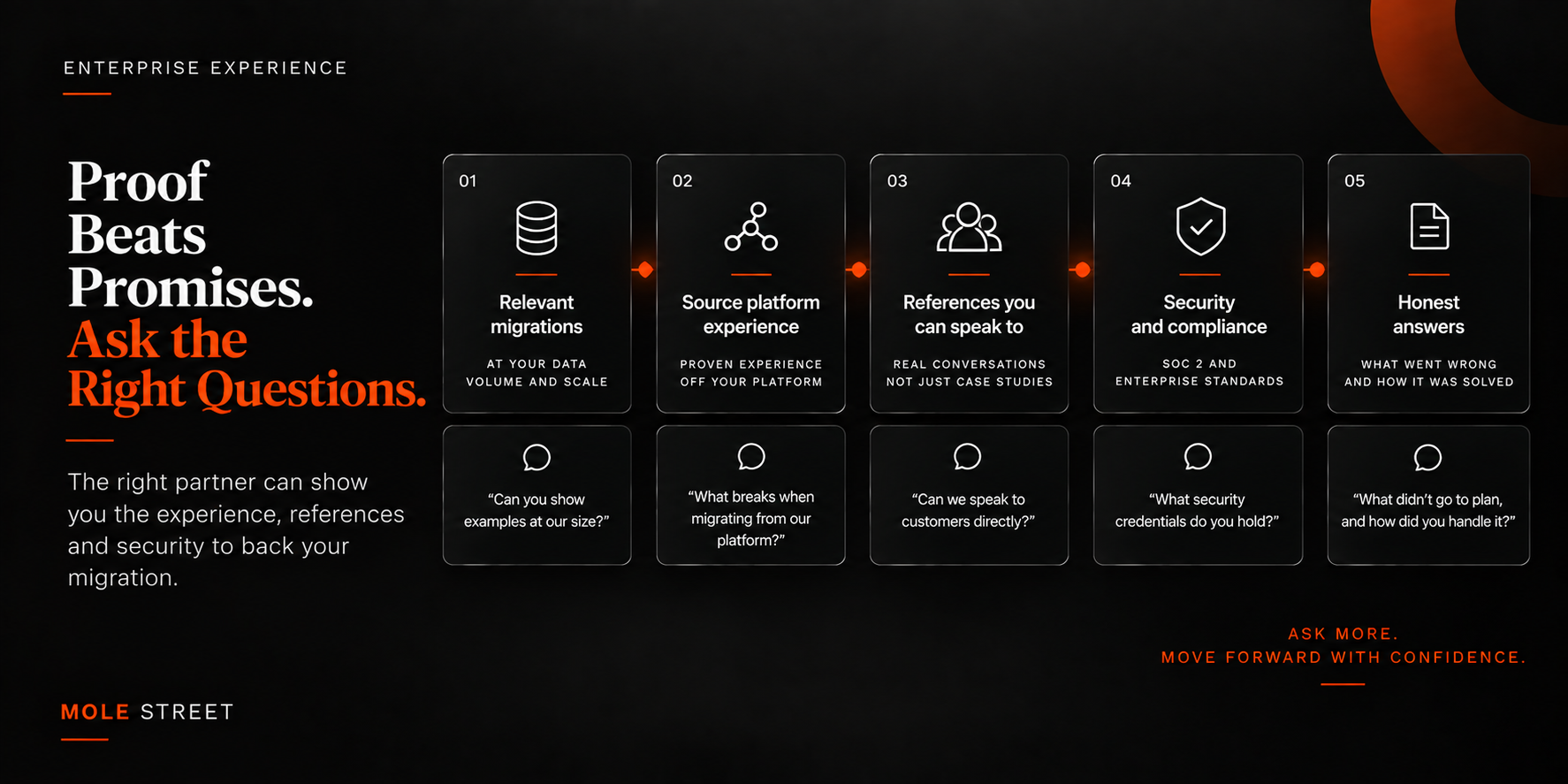
Verify enterprise experience by asking for completed migrations at your data volume and off your source platform, references you can actually speak to, and a security posture such as SOC 2.

Enterprise migrations are high-stakes, and proof beats promises.

References are worth more than case studies because you can ask what went wrong. A good reference will tell you what slipped, what was discovered late, and how the provider behaved once the invoice was already signed.

The red flag: no references at your scale and no security credentials to point to.

ChatGPT Image Sep 14, 2026, 11_29_08 AM

What Do the Top HubSpot Migration Services for Large Enterprises Have in Common?

The top HubSpot migration services for large enterprises share three traits: They protect your data and reporting, they unify the complete stack rather than one system and they can prove their capability with references at your scale.

Everything else, such as pricing and timelines, is secondary in comparison. A useful shortlist test is to ask each provider how they’ll preserve your historical reporting and handle the systems you’re not migrating, in addition to providing you a migration example off your exact source platform. The answers separate the field of candidates quickly. For a view of who is operating at this level, see our roundup of enterprise HubSpot migration partners.

What Are the Red Flags in a HubSpot Migration Service?

The clearest red flag is a provider who quotes a fixed price and timeline before any discovery of your data and systems. A migration cannot be scoped accurately without understanding what is being moved. Watch for these warning signs:

  • No discovery phase before a quote
  • No sandbox or data-validation step before go-live
  • No specifics about how your source platform differs from HubSpot
  • No plan for reporting or attribution continuity
  • No rollback option if the cutover fails
  • No references at your scale or in your industry
  • A migration described as a straight export and import

Any one of these should prompt harder questions, and a combination of several is a reason to walk away.

How Do You Compare HubSpot Migration Services?

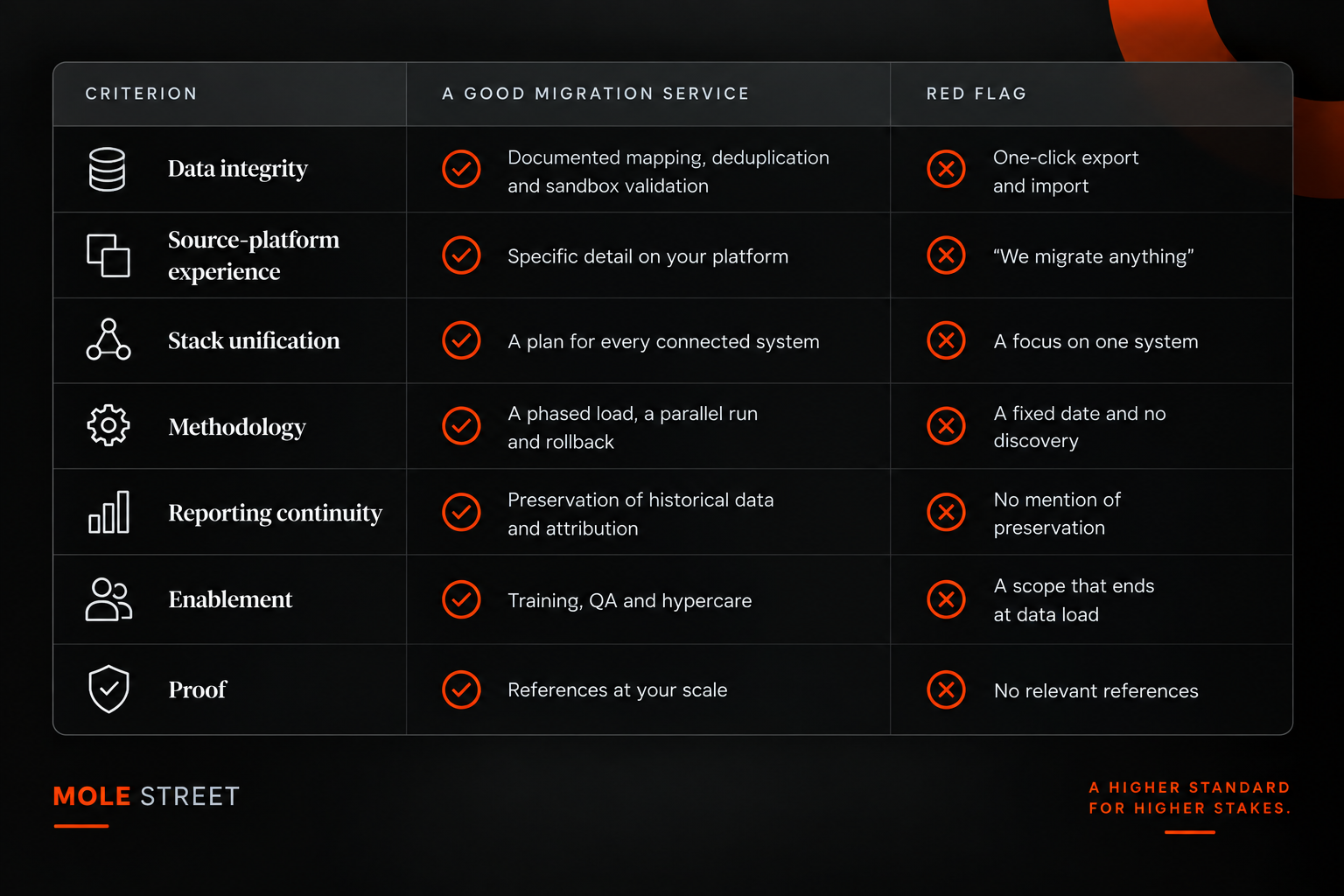
Compare services on the same criteria side by side, scoring each on data integrity, source-platform experience, stack unification, methodology, reporting continuity, enablement and proof. Scoring every provider against the same list ensures the decision focuses on expected outcomes rather than the polish of the pitch.

ChatGPT Image Sep 14, 2026, 11_31_34 AM

The Right HubSpot Migration Service Protects Your Data and Unifies Your Stack

The right HubSpot migration service is judged less on price and more on whether it can preserve your data and reporting while unifying a stack that has grown complex over time. A cheaper migration that loses your history or leaves your systems disconnected can cost far more to correct than it saves.

The providers worth your shortlist are the ones who ask about your specific source platform and insist on discovery before a quote. They can point to experience in enterprise migrations that look like yours. Judge them on that criteria, and the migration becomes the moment your stack finally works as one system, which is what you were promised in the first place.

Want to see if a HubSpot migration is right for you?

Book Your Free Consultation Now

Frequently Asked Questions

How long does a HubSpot migration take for a large enterprise? It depends on data volume and stack complexity, but enterprise migrations are typically measured in months, once discovery, phased data loads, a parallel run and validation are accounted for. A provider quoting a fixed timeline before discovery is merely guessing.

Can you migrate historical data and reporting into HubSpot? Yes. Historical records and attribution history can be carried over, but it must be planned for explicitly. If a provider doesn’t mention reporting continuity, assume it isn’t in the scope.

What is the difference between a HubSpot migration and a HubSpot implementation? A migration moves your existing data and processes from another platform into HubSpot. An implementation builds and configures HubSpot for how you work. Enterprise projects usually involve both, which is why source-platform experience and configuration experience both matter.

Do you need to pause your marketing during a migration? Not with the right methodology. A phased migration and a parallel run let you keep operating on your current system until the new one is validated, so there is no period where your system is dark.

How do you migrate from Marketo to HubSpot without losing attribution? Map Marketo's program and campaign structure to HubSpot's model before the move and carry over the historical data that feeds your attribution. You must also decide where attribution will be calculated after go-live. If completed in that order, your reporting reconciles on day one.

Want to Take The First Step Forward to a Unified Tech Stack?