How to Synchronize CRM Data Across Marketing, Sales, and Service Teams

19 min read
How to Synchronize CRM Data Across Marketing, Sales, and Service Teams

Splintered departments. Siloed teams. A different version of the customer in every system. These are the symptoms of a fragmented tech stack that fails to consolidate data, and it's one of the greatest growth inhibitors for any company that wants to scale to the heights of their ambitions. 


All too often, we see businesses experience the ripple effect of these deficiencies, and it impacts everything from daily campaigns to boardroom reporting: marketing emails a customer who churned last month, sales chases a lead that service already flagged as unhappy, and leadership opens three reports that each show a different number. 

Does this sound familiar? 

Synchronizing your CRM data across marketing, sales, and service is what solves this problem if it's built the right way. This guide will show you the two integration architectures and when each fits, why some systems cannot be synced one-to-one, and the governance rules that keep the data clean. 
Get those right and marketing, sales, and service finally run on one view of the customer, not three.

Key Takeaways

  • Integration vs synchronization: an integration connects two systems; synchronization is a continuous integration that keeps their data aligned over time.

  • Two architectures: use point-to-point when systems share a data model (CRM to ERP), and hub-and-spoke when your data is spread out across multiple systems and needs to be normalized.

  • Govern before you connect: set field-level ownership, sync direction, and a conflict rule (source priority or last write wins) before you wire any systems together.

  • Gate the junk: filter out low-value records before they sync, or you spread your worst data across every system.
ChatGPT Image Sep 2, 2026, 11_17_01 AM

What Is CRM Data Synchronization? 


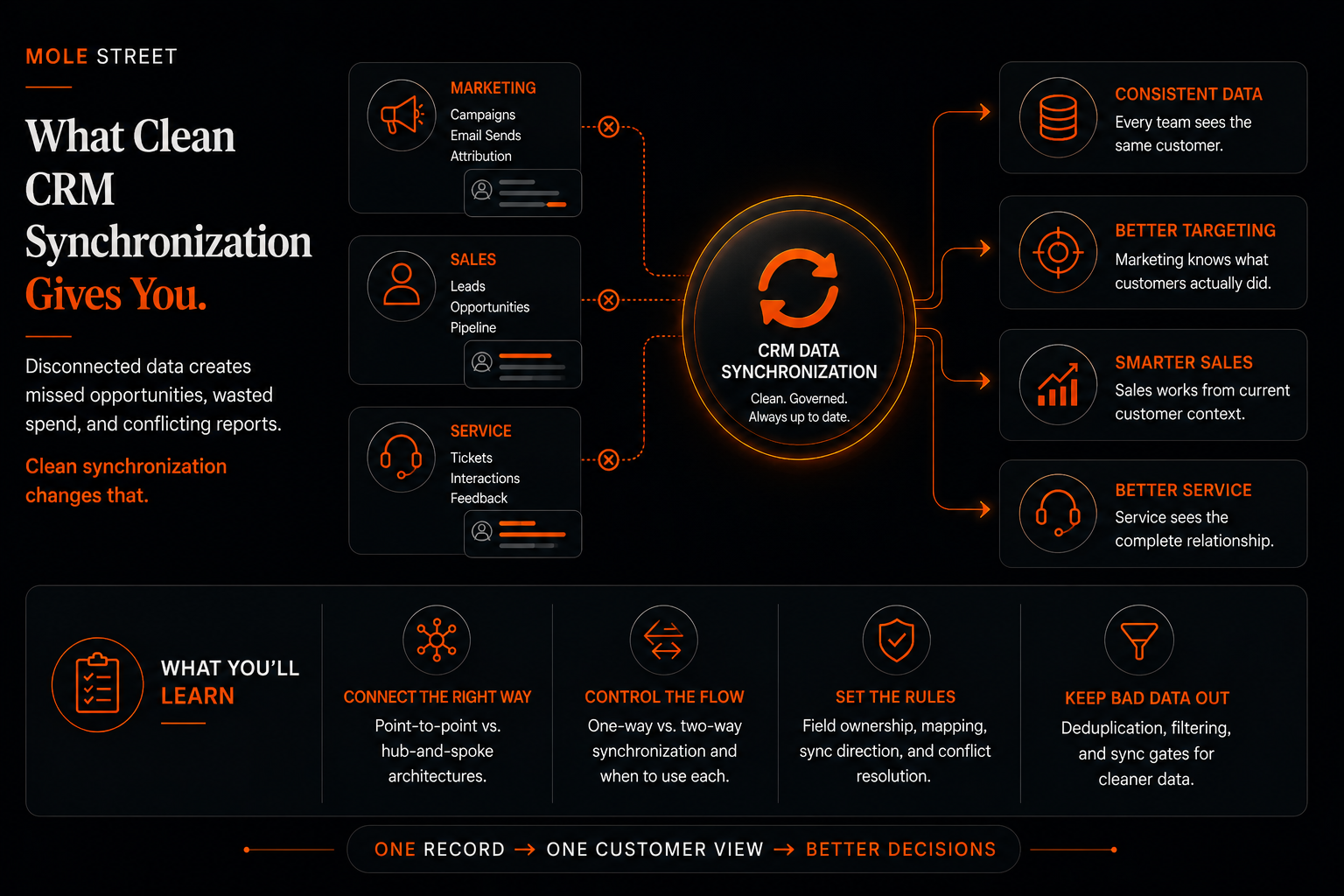
CRM data synchronization is the process of automatically keeping your customer records consistent across the systems you connect, so that when a record is created or updated in one, the change is reflected in the others and every system holds the same, current data.

In this case, CRM data synchronization allows your marketing, sales, and service teams to read and write to the same version of the truth. This is the holy grail of customer data because it provides you with one connected record that every team can trust.

You'll most likely have heard "integration" and "synchronization" used as if they're the same thing. They're related, but not the same. An integration connects two of your systems so they can pass data. Synchronization is the continuous version: an integration governed by rules that keeps the same data aligned in both systems over time.

That difference is more than semantics, because it shapes where you begin. Before you decide how a single field flows or who owns it, you decide how your systems connect as a whole. That is an architecture decision, and it comes first.

Why Does CRM Data Synchronization Matter?

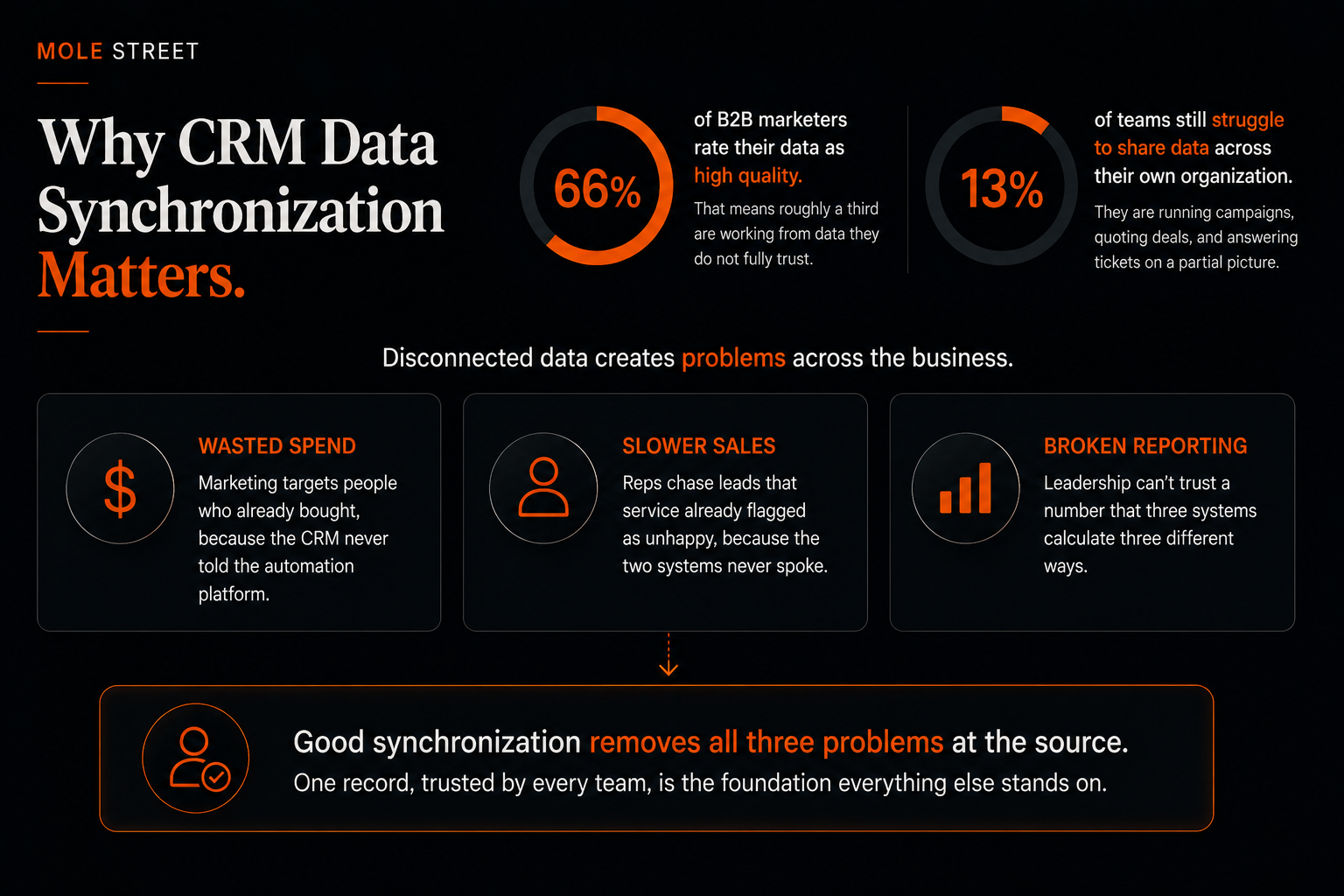
CRM data synchronization matters because disconnected data caps what every downstream team can do, from campaign targeting to forecasting to service response. When the record is fragmented, so is the customer experience built on top of it.

The scale of the problem is well documented. In the HubSpot 2026 State of Marketing Report, only 66% of B2B marketers rate their data as high quality, which means roughly a third are working from data they do not fully trust.

In the same research, 13% of teams say they still struggle to share data across their own organization. Every one of those teams is running campaigns, quoting deals, and answering tickets on a partial picture.

The consequences are wide-reaching, likely to impact you in three familiar places:

  • Wasted spend: Marketing targets people who already bought, because the CRM never told the automation platform.

  • Slower sales: Reps chase leads that service already flagged as unhappy, because the two systems never spoke.

  • Broken reporting: Leadership cannot trust a number that three systems calculate three different ways. 

Good synchronization removes all three at the source. One record, trusted by every team, is the foundation everything else stands on, and it's the reason so many enterprises bring in agencies that specialize in aligning marketing, sales, and service data rather than wiring it together in-house. 


ChatGPT Image Sep 2, 2026, 11_32_10 AM

Point-to-Point or Hub-and-Spoke: Which Integration Architecture Do You Need?

There are two dominant integration architectures, and the one you need comes down to whether your systems store data in a compatible way. Point-to-point connects your systems directly to one another, and it works when they share a compatible data model, so information moves between them with little reshaping.

Hub-and-spoke puts a central data store in the middle (usually a data warehouse or data lake), feeding every system from one place, and it's what you need when they don't, because the data has to be transformed and standardized before it fits.


How Does a Point-to-Point Integration Work?

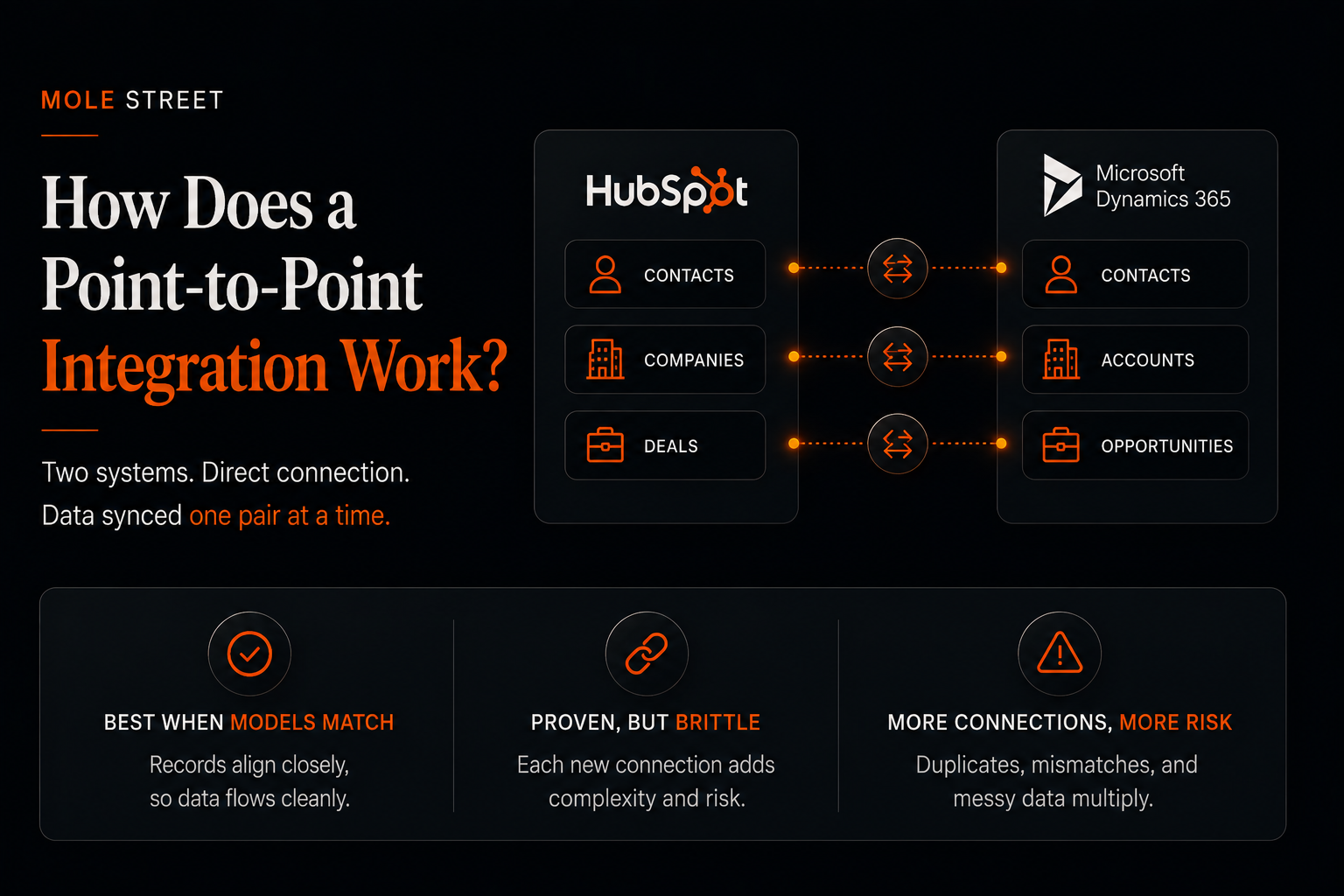
A point-to-point integration works by connecting two systems directly and syncing data between them, one pair at a time. It works cleanly when both systems speak the same language, meaning they share the same kinds of records. It’s also commonly used when the two systems being connected do not connect with other downstream systems in a meaningful way.

HubSpot has contacts, companies, and deals; Dynamics has contacts, accounts, and opportunities. Those map closely, so you can sync them without reshaping anything.

String a few of these together and you'll start to see familiar patterns. You might run HubSpot into your CRM, then that CRM into an ERP like NetSuite.

Point-to-point is proven, but it gets brittle without having the right processes or data governance in place. For example, someone might add a contact straight into the CRM & then someone else adds the same Contacts without an email address into the ERP system. The sync has no way to tell they're the same person, so you end up with duplicate records and messy data on both sides.

It also multiplies deduplication problems, because every new direct connection adds another place the same person can be created twice. The more systems you wire this way, the more the connections resemble a web, and the harder it becomes to keep everything in sync.

This is where our partnership with Kinective comes in, taking the export out of the core so the warehouse can turn it into something HubSpot can use. We built exactly this for Pinnacle Bank, consolidating ten-plus systems into one platform.

ChatGPT Image Sep 2, 2026, 11_44_46 AM

How Does a Hub-and-Spoke Integration Work?

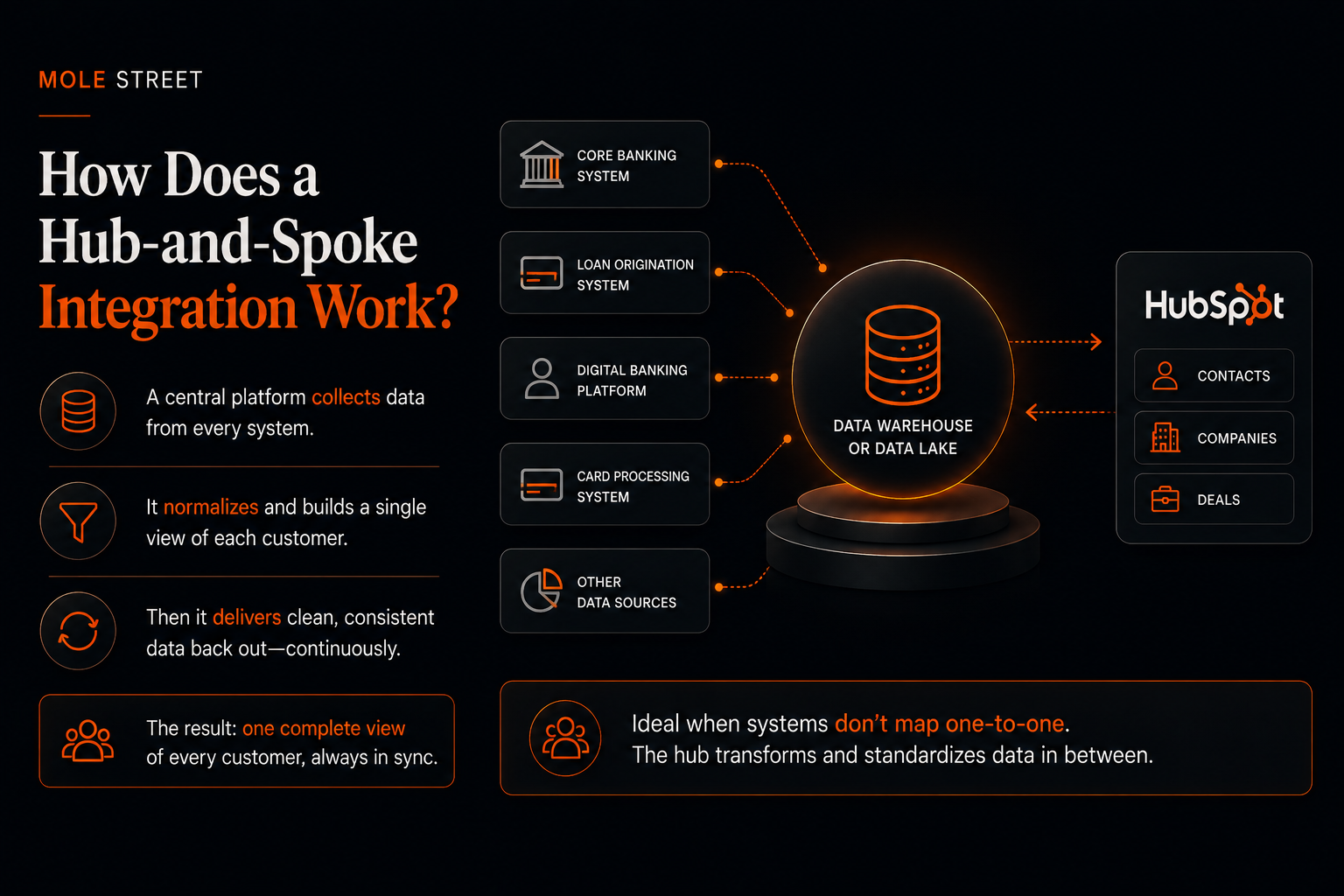
A hub-and-spoke integration puts a central platform, such as a data warehouse or data lake, in the middle of your stack. It continuously collects data from every system, including HubSpot, normalizes it, builds a single view of each customer, then feeds that clean data back out. You use it when your systems do not map one-to-one and a transformation has to happen in between.

Banking is the clearest case. A core banking system does not structure data the way HubSpot does, so having a data warehouse in between the systems allows the data to be transformed and normalized so it can pass back and forth.

A hub-and-spoke model taps those sources together, assembles the full picture of the member, and syncs it to HubSpot on an ongoing basis.

ChatGPT Image Sep 2, 2026, 11_47_01 AM

Why Can't You Sync Every System One-to-One?

You cannot sync every system one-to-one because two systems only align cleanly when they share the same data model. When they do not, the data has to be transformed first, reshaped from one system's structure into another's before it can land.

A core banking system is the clearest example. It stores everything about a member, contact details, household, and every account they hold, in one record. HubSpot doesn't work that way: it keeps contacts, companies, and deals as separate, linked records. So a single record out of the core has to be broken apart and rebuilt as several records in HubSpot before it fits.

What Is the Difference Between a Flat File and a Relational Database?

The difference between a flat file and a relational database comes down to how they store records. A relational database keeps each type of record in its own table and links them together. A flat file mashes every type into a single table. HubSpot is relational; most core systems export a flat file.

In HubSpot, contacts and companies live in separate tables you can associate, marrying a contact to the company they belong to. A flat file collapses all of that into one sheet, where the primary contact, their accounts, and other household members sit in the same row.

You cannot pour that into one contact record, so the transformation splits it apart. In our credit union builds, that single file becomes:

  • Contacts for the individual people, including additional household members
  • A custom object to represent the member
  • Deals to represent the accounts each member holds, and their type

That reshaping is precisely why the hub-and-spoke model exists. For a deeper look at how this plays out inside financial institutions, see our guide on preventing data silos in credit union integrations.

What Tools Actually Move and Transform the Data?

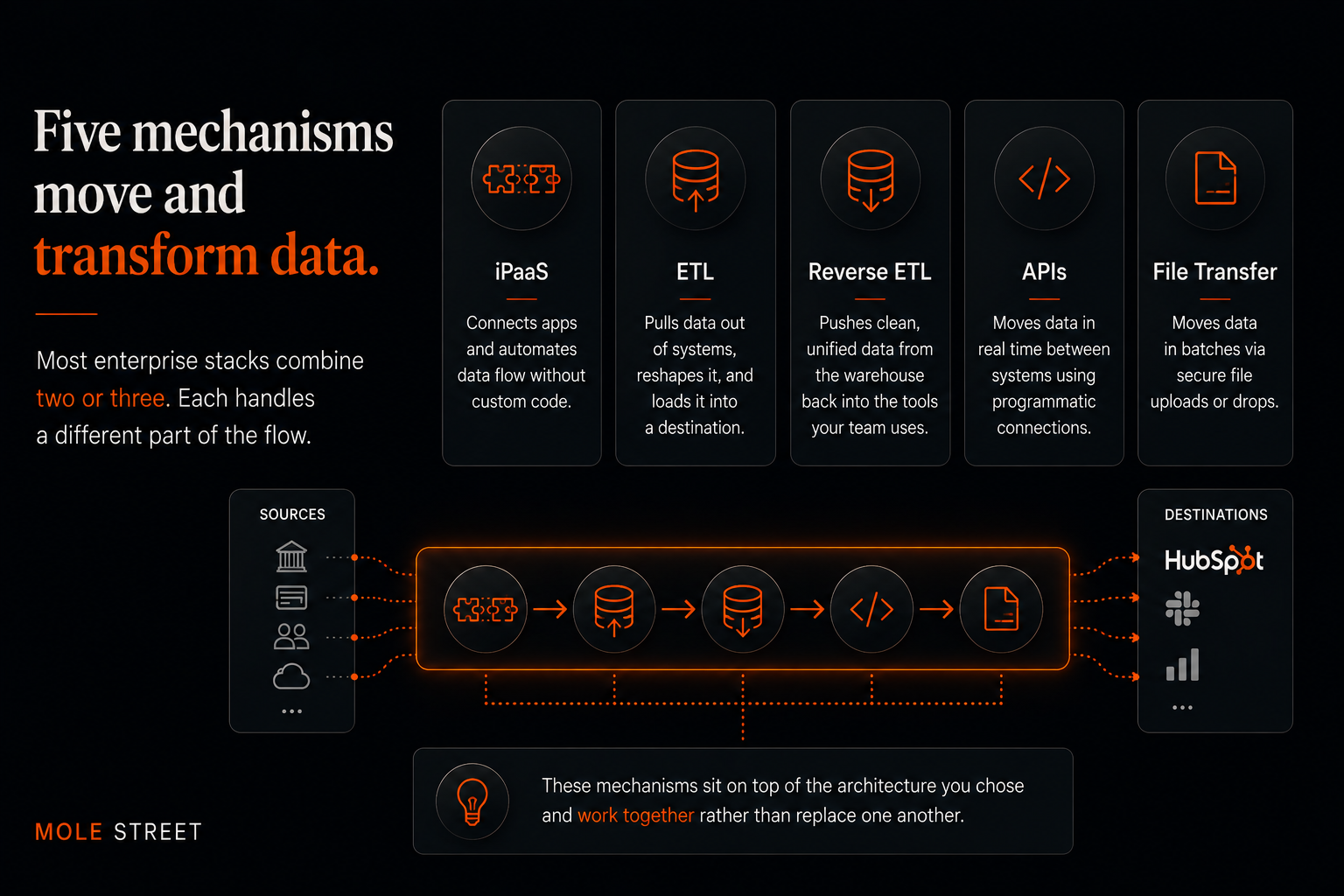
The architecture decides the shape of your integration. The tools decide the mechanics of it. There are five common mechanisms for moving and reshaping data, and most enterprise stacks combine two or three rather than relying on one.

These mechanisms sit on top of the architecture you chose, and they tend to work together rather than replace one another. Most stacks run two or three at once, each handling a different part of the flow.

Below are a few of the terms that are worth translating, since they get thrown around loosely:

  • iPaaS stands for integration platform as a service. It is the connective software (Workato, Zapier, Make, HubSpot Operations Hub) that links your tools together without anyone writing custom code.
  • ETL pulls data out of a system, reshapes it, and loads it into a destination, usually a data warehouse, the central store where a company keeps all its data for reporting and analysis.
  • Reverse ETL runs the other direction. It takes that clean, unified data sitting in the warehouse and pushes it back into the everyday tools your team lives in, like the CRM.

Platforms like HubSpot's Operations Hub blur these lines further, offering native style integration with programmable rules on top, which is why many mid-market teams start there before reaching for custom code.

ChatGPT Image Sep 2, 2026, 12_00_01 PM

One-Way vs Two-Way Sync: Which Do You Need?

Use one-way sync when a single system owns the record, and two-way sync when people enter and edit data in both. The choice comes down to one question: who edits the data? Get that call wrong and you'll feel it fast, because overwritten records and sync loops almost always trace back to it.

One-way sync flows data from a source of truth into a destination. Your billing system owns invoice data, so it pushes into the CRM and the CRM never writes back. Clean, predictable, low-risk.

Two-way sync lets both systems update each other. Your CRM and your marketing platform both capture email engagement and contact details, so each needs the other's updates. More powerful, and more dangerous, because two systems editing the same field will eventually disagree.

Timing is the second dimension: real-time or trigger-based sync moves data the moment it changes, while batch sync moves it on a schedule, which is cheaper and fine for fields that do not change by the minute.

And two-way sync only works if you set conflict rules. Without them, the two systems keep overwriting each other until the data is a mess. Setting those rules is what the next section covers.

How Do You Handle Sync Conflicts and Data Governance?

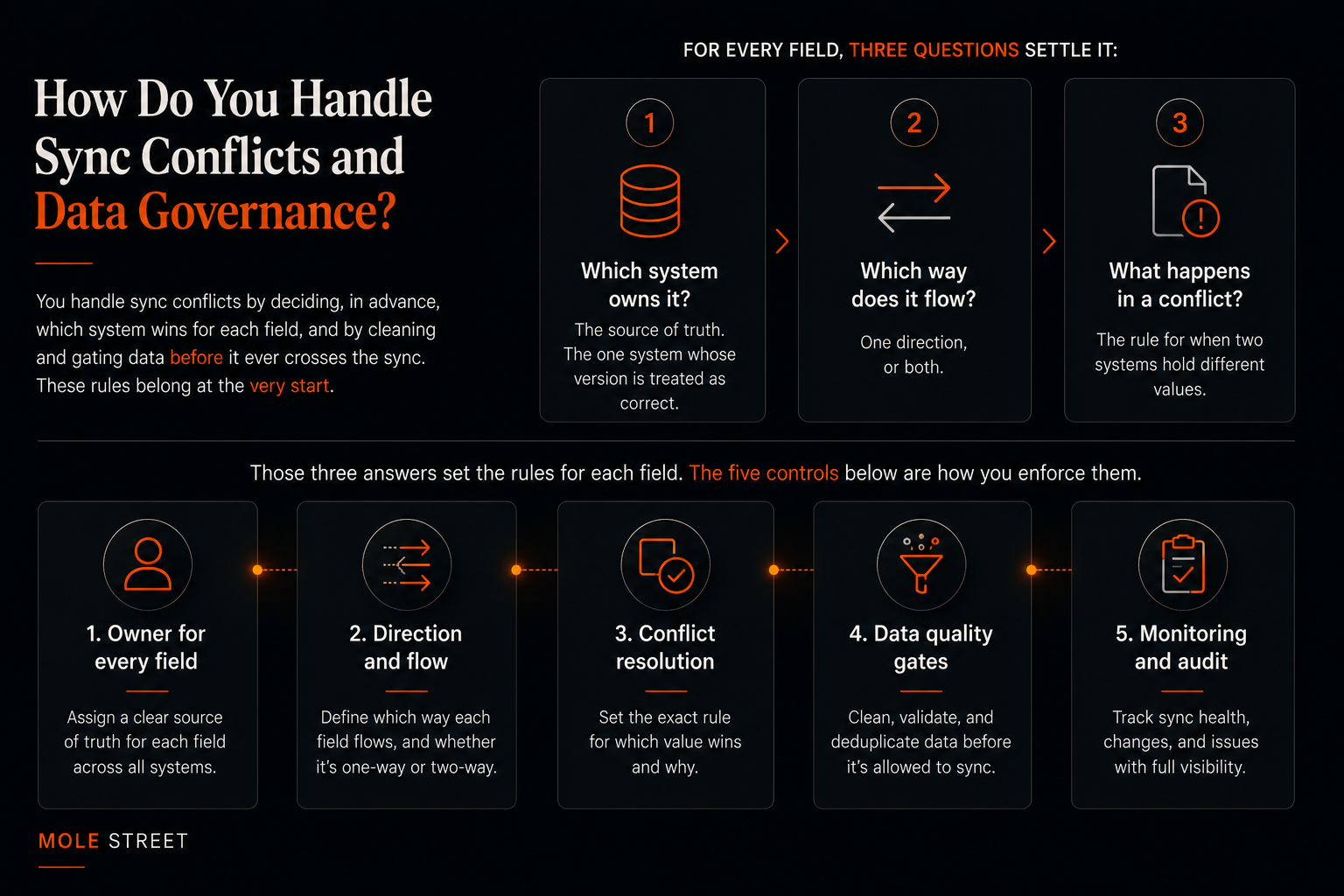
You handle sync conflicts by deciding, in advance, which system wins for each field, and by cleaning and gating data before it ever crosses the sync. These rules are what data governance means in practice, and they belong at the very start, before you connect a single system, because they decide how the whole sync behaves.

For every field, three questions settle it:

  • Which system owns it? The source of truth, the one system whose version is treated as correct.
  • Which way does it flow? One direction, or both.
  • What happens in a conflict? The rule for when two systems hold different values.

Those three answers set the rules for each field. The five controls below are how you enforce them, from naming an owner for every field to gating out the junk before it ever syncs.

ChatGPT Image Sep 2, 2026, 12_02_41 PM

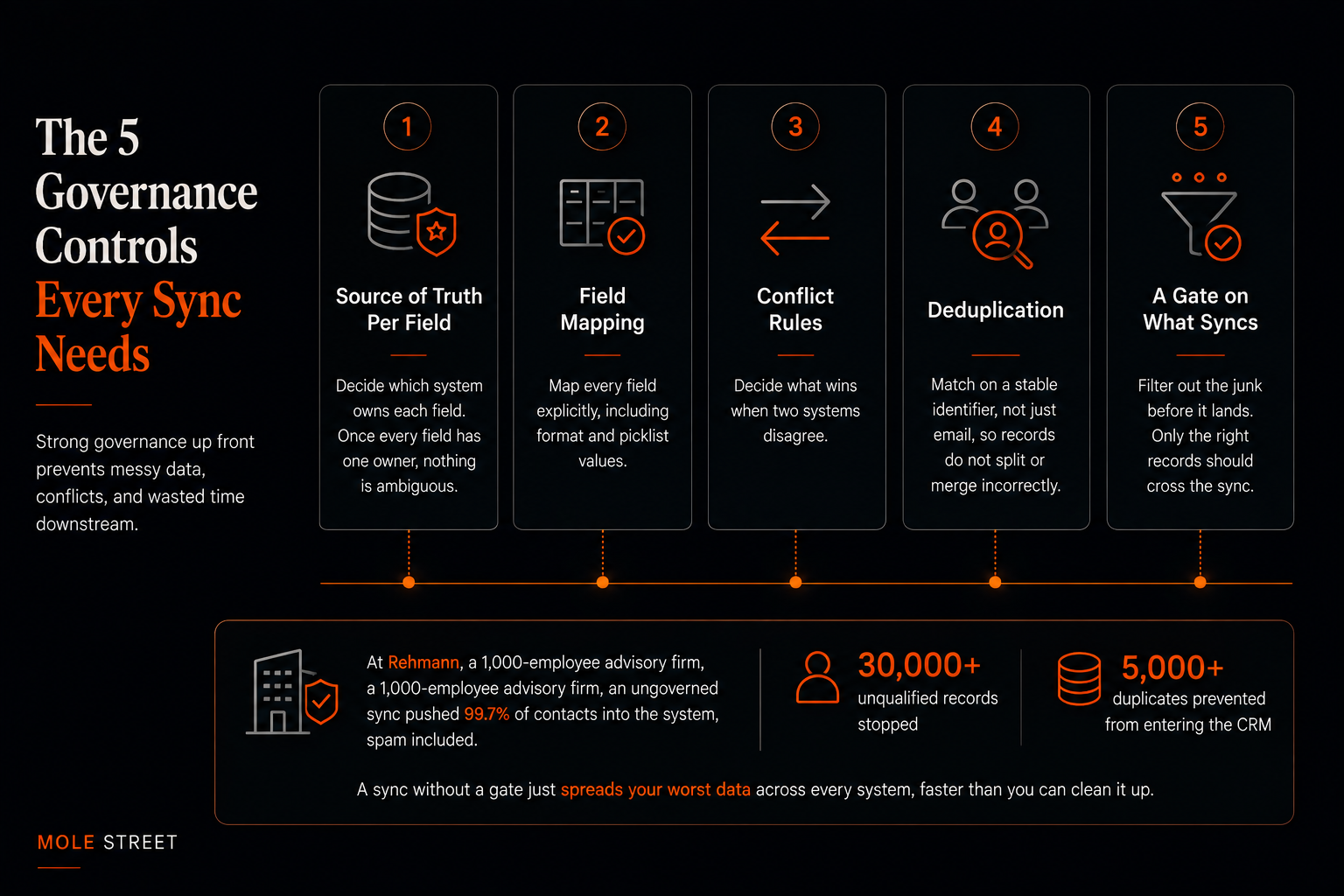
The 5 Governance Controls Every Sync Needs


Source of Truth Per Field

Decide which system owns each field. Billing owns invoice totals, the CRM owns lifecycle stage. Once every field has one owner, nothing is ambiguous.

Field Mapping

Map every field explicitly, including format and picklist values, so "CA" and "California" do not become two versions of the truth.

Conflict Rules

Decide what wins when two systems disagree. The two common rules are "last write wins," where the most recent update sticks, and "source priority," where the system that owns the field always wins.

Deduplication

Match records on a stable identifier, such as a customer ID that never changes, rather than just email, so a shared address or a name change does not split or merge the wrong records.

A Gate on What Syncs

Not every record deserves to cross. Filter out the junk before it lands, because the records that shouldn't sync are the ones that cost you the most.That last control is the one teams skip, and it is expensive.

When Mole Street took over an ungoverned CRM setup at Rehmann, a 1,000-employee advisory firm, the existing sync pushed 99.7% of contacts into the system, spam included.

Replacing it with a revenue-only gate stopped more than 30,000 unqualified records and 5,000 duplicates from ever reaching the CRM. The key takeaway here is that a sync without a gate just spreads your worst data across every system, faster than you can clean it up.

ChatGPT Image Sep 2, 2026, 12_05_00 PM

What Are the Most Common CRM Data Synchronization Mistakes?

The three most common CRM data synchronization mistakes are syncing everything without a filter, skipping a defined source of truth, and using two-way sync without conflict rules. Each one turns a helpful integration into a data problem that compounds daily.

Watch for these six:

Forcing a one-to-one sync where a transformation is needed

When two systems store data differently, connecting them directly just copies the mismatch. Reshape the data first.

Syncing everything

No filter means every junk record, test contact, and spam signup floods your system of record.

No defined source of truth

When no system officially owns a field, every system fights over it.

Two-way sync without conflict rules

The recipe for overwrite loops and stale data winning.

Cleaning after sync instead of before

Garbage in, garbage synchronized. Fix data quality first. No monitoring or error handling. Syncs fail silently, and you find out weeks later from a broken report.

If you avoid these mistakes, your sync will hold up well as your data grows, instead of running into problems the moment the volume increases.


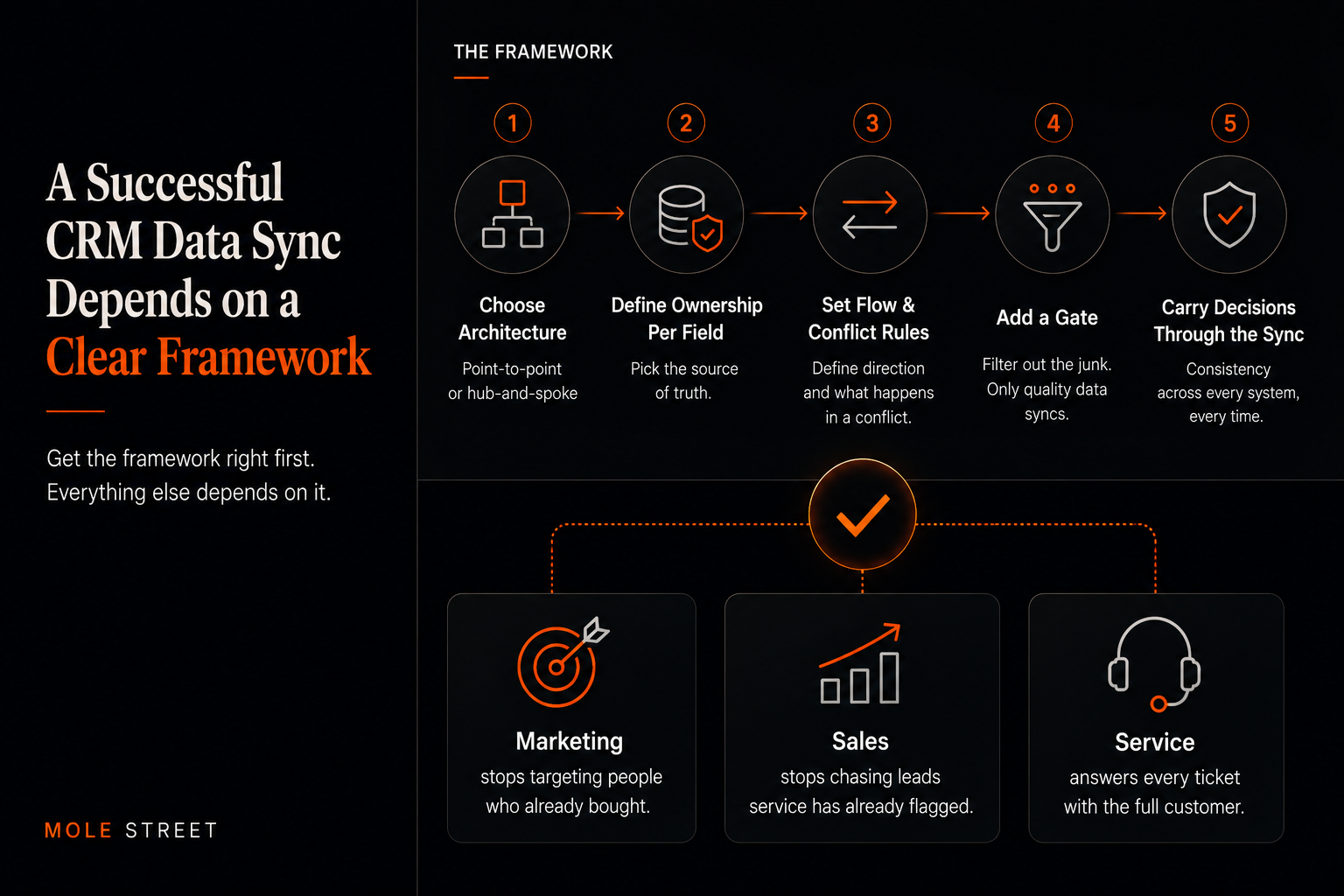
A Successful CRM Data Sync Depends on a Clear Framework

A successful sync depends on the decisions you make before you connect anything. First, choose the architecture your stack needs: point-to-point where systems share a data model, hub-and-spoke where they do not.

Then, for every field, decide which system owns it, which way the data flows, and what happens when the two systems disagree. Add a gate to keep the junk out, and those decisions carry the whole sync.

Most teams do it the other way round, plugging in a connector and working out the rules later, which is why the problems surface fast.

Duplicates pile up, because nothing matches records on a stable ID. Good data gets overwritten with stale values, because no system was named the owner. And a customer who churned last quarter still lands in this week's campaign, because the junk was never gated out.

Get the framework right, and none of that happens. And what does this lead to?

Marketing stops targeting people who already bought. Sales stops chasing leads that service has already flagged. And service answers every ticket with the full customer in front of them.

ChatGPT Image Sep 2, 2026, 12_10_07 PM

Frequently Asked Questions

How often should CRM data sync?

It depends on the field. Sales-critical data like lead activity often syncs in near real-time, while slower-moving data like billing or firmographics can sync in scheduled batches. Matching frequency to the data avoids unnecessary cost and load.

Does two-way sync cause loops?

It can, if there are no conflict rules. A loop happens when two systems keep "correcting" each other. Defining a source of truth per field and a clear conflict rule (such as source priority) prevents it.

What is reverse ETL?

Reverse ETL is the process of pushing modeled data from a data warehouse back into operational tools like your CRM. It lets teams unify data once in the warehouse, then sync clean, consistent fields to where reps and marketers work.

What is the difference between CRM integration and synchronization?

Integration connects two systems so they can exchange data. Synchronization is a continuous, rule-governed form of integration that keeps that data consistent in both systems over time. You can integrate without keeping the data in sync.

Should every field sync between systems?

Sync only the fields each team genuinely needs, and gate out junk records. Syncing everything increases cost, noise, and the risk of overwriting good data with bad.

Want to Take The First Step Forward to a Unified Tech Stack?