How to Turn Your GTM Outbound Into Predictable Revenue With HubSpot
I wrote this post on the back of a fantastic webinar we hosted with Belkins and Apollo recently. With over 300 attendees and an overwhelming number of replay requests, it became clear that GTM leaders are hungry for practical guidance on building connected demand engines. This guide captures the key insights from that conversation, distilled into actionable strategies you can implement immediately.
- Harry Maule, Content Manager, Mole Street
Knowing how to engage customers and persuade them to buy is the holy grail of business. Companies yearn for it and yet few can achieve it. Those that succeed do so with unwavering conviction to build world-class go-to-market teams designed around connected systems where data is accessible, clean, and structured to power scale.
Those that fail share a different story: one that consumes time and capital without producing meaningful outcomes. It’s the consequence of a disconnected tech stack and it’s just as frustrating as it is costly.
Why?
Because it burdens go-to-market teams with structural challenges that make successful lead generation feel out of reach, and in some cases, entirely impossible.
This is what happens when you have Apollo (or any other enrichment tools) and your CRM operating in isolation instead of as one connected system. When this happens, the different parts of your go-to-market motion operate in isolation, creating a disconnected web of activity with no cohesion.
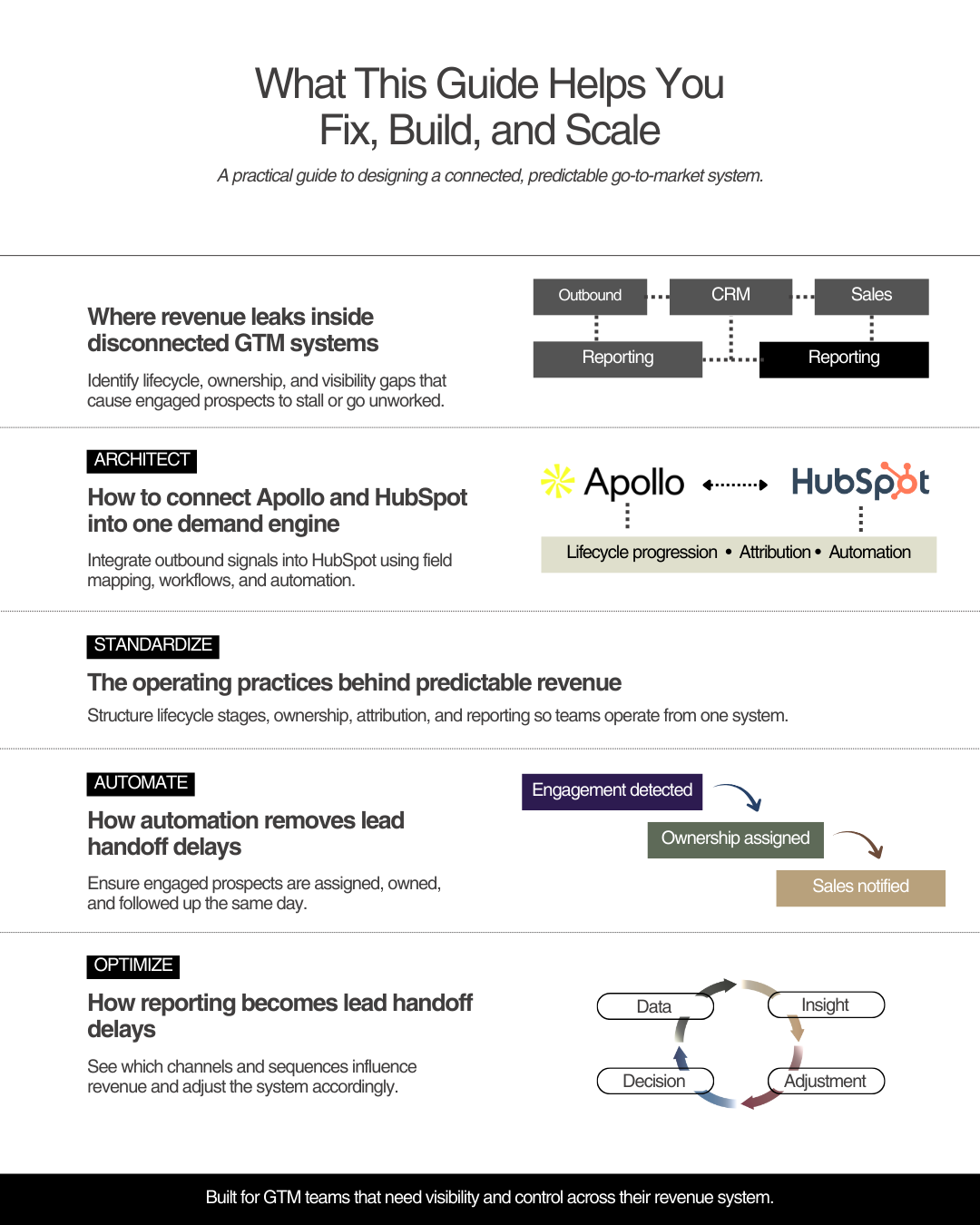
The good news is that you can solve this problem with a simple solution. HubSpot can sit at the center of your GTM stack, capturing outbound activity from tools like Apollo and translating it into lifecycle progression, automation, and reliable reporting.
Content callout: Mole Street already has a blog that covers How HubSpot Is Transforming Martech for More Powerful Data-Driven Marketing Campaigns that you will find valuable. Make sure to give it a read.
With a connected system in place, go-to-market teams align, execute with clarity, and gain real-time visibility into what’s actually driving pipeline and revenue.
In this blog, we’ll show you how to architect a connected GTM system with HubSpot as your source of truth, so your outbound activity actually drives lifecycle progression, attribution, and revenue.
Want to watch the full webinar with Belkins and Apollo? Watch it here.
Why Modern GTM Teams Break: Their Systems Aren’t Connected
We are living through an exponential shift in technology, moving rapidly from the digital era into the age of AI. Businesses are built on a mountain of different tools, applications and software to complete specific tasks that move them closer to their goals.
Consequently, most of their tech stack remains fragmented, as tools are simply bolted onto one another. When this happens, the ramifications ripple across the organization, undermining every part of the GTM motion.
Legacy systems like AEM and Sitecore exemplify this problem. They're rigid, expensive, and require constant developer intervention, making it nearly impossible for GTM teams to move with agility.
1. Fragmented Tools Create Data Silos
Data fragmentation is one of the biggest growth killers amongst businesses today. JPMorgan (2024) estimates that fragmented data systems cost the global economy $3.1 trillion every year in lost productivity and revenue.
Discover how tech fragmentation specifically impacts wallet share growth in wealth management firms with real-world example of these costs in action.
GTM organizations are no different. Lift up the hood and you’ll see severe data fragmentation that forces businesses to work in isolation.
- Outbound activity lives in Apollo (emails sent, sequences running, engagement tracked)
- Marketing automation lives in HubSpot workflows or Marketo
- Sales conversations live in Slack threads, email inboxes, or sales engagement tools
- Deal data sits in spreadsheets or disconnected sales systems
- And none of it flows together
This pattern mirrors the broader shift away from monolithic, siloed enterprise systems (such as legacy CMS platforms) toward modern, connected ecosystems. We explore this shift in more detail in our blog, How the Decline of AEM Signals a New Era for Enterprise CMS. The same lack of connection undermines go-to-market performance when tools do not communicate.
What this looks like in practice
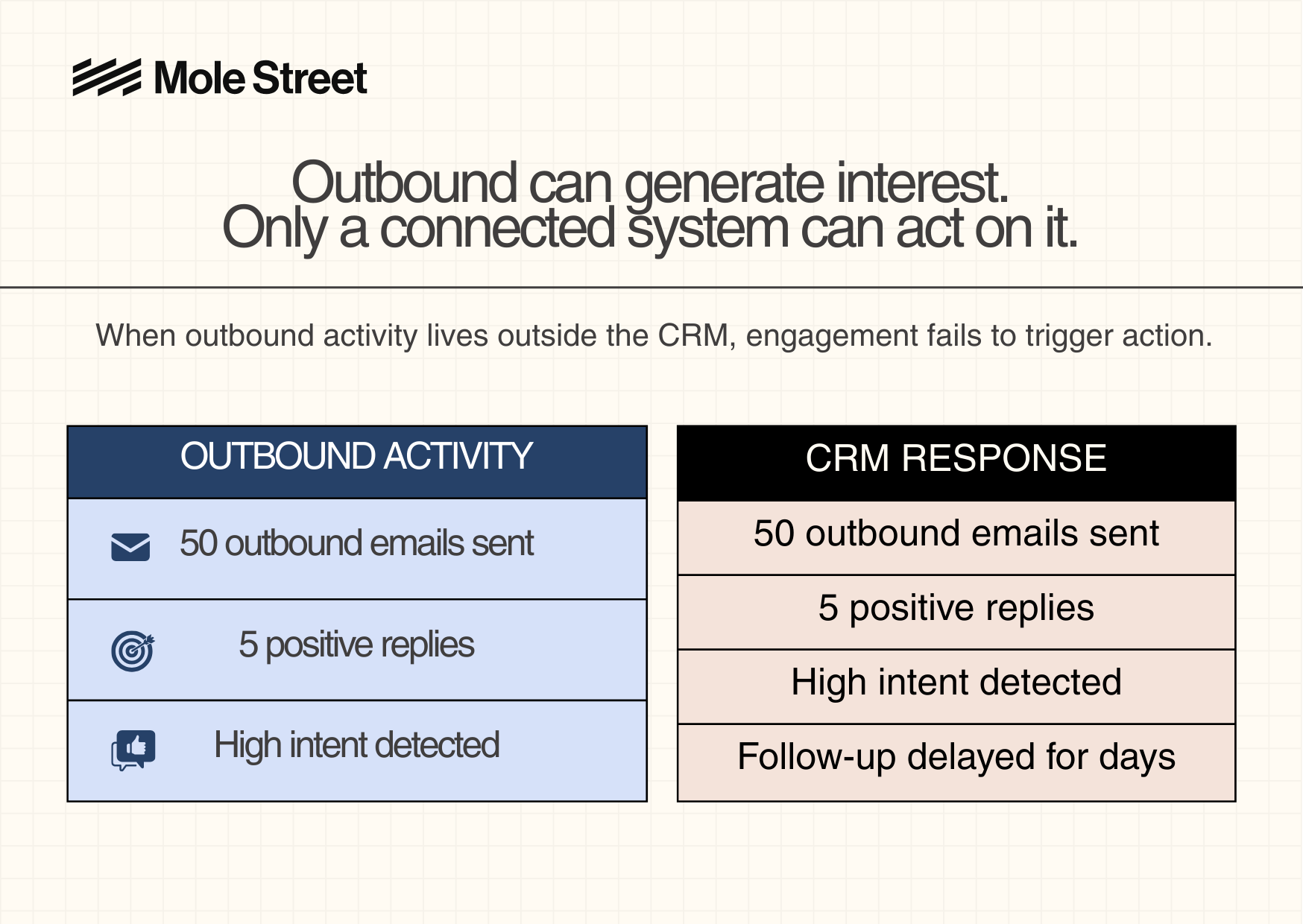
An Apollo sequence sends 50 outbound emails over two weeks. Five prospects respond with genuine interest.
But in HubSpot, nothing happens.
Those five contacts remain marked as generic “Leads” with no owner assigned. Sales isn’t notified. No follow-up is triggered. The leads sit untouched for three days, long enough for prospects to lose interest or choose a competitor.
When customer data is scattered across disconnected tools, GTM teams lose:
- A unified view of the customer: You can't see the full journey. Marketing thinks a contact is cold. Outbound thinks they're engaged. Sales has no idea who they are.
- Clarity on which channels drive revenue: You have Apollo data, HubSpot data, and LinkedIn data all telling different stories. Which one is right?
- The ability to measure ROI across the entire journey: You can't trace a deal back to its source because touchpoints live in different systems.
This fragmentation compounds quickly, resulting in disjointed follow-up, redundant outreach, and a growing list of missed opportunities. This level of inaccuracy is what drains revenue and hampers your ability to maximize growth.
2. Lifecycle Stages Fail to Reflect the Buyer Journey
Fragmented data leads to inconsistent lifecycle updates across teams. Marketing marks a contact as an “MQL” because they downloaded a whitepaper. Sales still sees them as a “Lead” because no conversation has happened. Outbound considers them “Engaged” after an email open.
Each team is technically acting on valid signals. But because those signals live in different systems, there’s no shared definition of where the prospect actually sits. The result is confusion, misaligned handoffs, and a breakdown in how leads move through the funnel.
Once lifecycle stages lose consistency, everything downstream suffers. Reporting becomes unreliable. Attribution falls apart. Forecasting turns into guesswork. Teams can’t see what’s working, leadership can’t trust the numbers, and outbound momentum stalls.
Lifecycle stages aren’t just labels. They’re the structure that keeps the entire GTM engine aligned. When that structure breaks, every downstream motion breaks with it, and predictable revenue becomes impossible.
3. Attribution Becomes Incomplete and Unreliable
When lifecycle stages break, attribution breaks with them. Attribution depends on clean data, accurate timestamps, and a consistent view of how prospects move through the funnel. When outbound activity lives outside the CRM, large parts of the buyer journey disappear. This makes it impossible to understand what actually drives revenue.
Example: Broken Attribution Caused by Disconnected Tools
Outbound activity in Apollo
-
Emails sent
-
Replies received
-
Meetings booked
Break in data flow
Outbound engagement is captured in Apollo but never reaches the CRM.
CRM view in HubSpot
-
No outbound touchpoints logged
-
Deals appear with no clear source
-
Attribution remains incomplete
Impact
-
No visibility into what actually influenced deals
-
No ability to optimize outbound strategy
-
Revenue attribution becomes guesswork
Example
A B2B services firm generated replies and booked meetings through Apollo, but when deals closed, HubSpot showed no outbound influence. Because Apollo data was not syncing properly, leadership had no visibility into where revenue originated or whether outbound was contributing to pipeline at all.
So what’s the key takeaway here? Attribution only works when outbound, marketing, and sales activity flow into one connected system.
4. Leadership Loses Visibility into Revenue Performance
Reporting, attribution, and lifecycle stages are crucial to measuring how revenue is created and where growth is coming from. Any inaccuracies will pull a veil over leaders and leave them blind to what’s working and what isn’t.
And so what’s the downstream effect of this? Leadership loses the visibility to make confident decisions. Dashboards may look complete, but the insights behind them are fractured. No one can clearly answer where pipeline is coming from, which channels are working, or why forecasts keep slipping.
This is catastrophic in every sense because executives are forced to make decisions with either incomplete or misleading data. Over time, trust in reporting erodes, confidence in forecasts disappears, and leadership is left managing outcomes instead of guiding strategy.
Without visibility into revenue performance, even the best GTM teams are reduced to guesswork, and predictable growth becomes impossible.
Content callout: See our guide to strategic growth for modern businesses for a deeper look at why connected systems are essential to scale.
How GTM Teams Unlock Revenue with HubSpot
High-performing GTM teams operate with a unified tech stack. Forrester’s Go-To-Market Architecture (2023) highlights that successful execution depends on coordinated planning across all buyer-facing teams, something that simply cannot happen when tools and data are fragmented.
A connected demand engine, with HubSpot at the center, makes this coordination possible. In practice, this means teams can use tools like Apollo for prospecting and sales engagement platforms for sequencing, while HubSpot serves as the system of record that aligns activity, data, and execution.
Having HubSpot as the central system allows these tools to operate as one coordinated engine rather than isolated platforms. This approach forms the foundation of a modern RevOps strategy, where tools and data are unified to drive predictable, scalable revenue.
When Apollo data flows cleanly into HubSpot, contacts are organized into consistent lifecycle stages, automation replaces manual handoffs, and GTM teams finally operate from a single source of truth. Here’s what that looks like in practice.
1. Use Lifecycle Stages as a System, Not Labels
The most competent GTM teams treat HubSpot lifecycle stages as a structural framework, not as static funnel labels. They define stages based on real buyer behavior and use workflows to move contacts automatically as prospects engage, reply, book meetings, or enter sales conversations.
Having clear distinctions between stages enables you to understand exactly when and how to progress leads through the funnel. When lifecycle stages are structured this way, and advanced automatically through HubSpot workflows based on real behavior, teams gain immediate clarity.
They can see where prospects stall. They can diagnose whether issues stem from targeting or messaging. They can align teams, prioritize the right actions, and scale what actually drives revenue. This is what turns go-to-market from a collection of activities into a system that scales.
2. Centralize Outbound Data Inside HubSpot
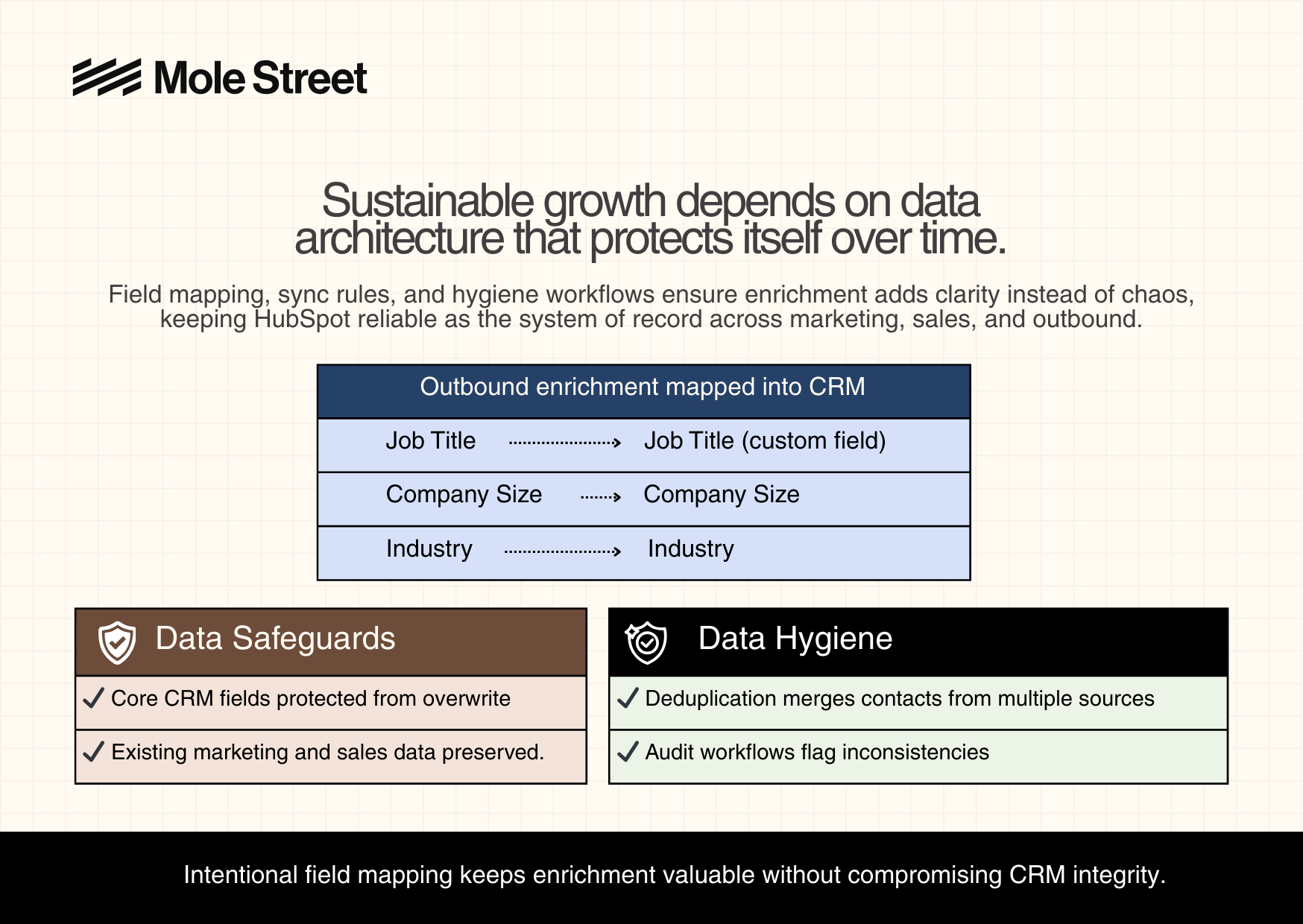
Outbound only works when its activity is visible inside the CRM. High-performing teams integrate Apollo so outbound emails, replies, and engagement signals are logged directly on the contact record in HubSpot.
This allows outbound to contribute to lifecycle progression, attribution, and reporting instead of operating in a silo. HubSpot becomes the place where inbound and outbound activity are viewed together, giving teams a complete picture of how deals are influenced over time, not just where they originated.
In fact, IDC research (2025) reveals that nearly 50% of sales teams lack visibility into buyer intent, creating a critical gap in how teams respond to real-time signals. When Apollo is integrated with HubSpot, every outbound signal (demo requests, pricing page visits, and email engagement) becomes visible to the entire GTM team. This shared visibility allows teams to act immediately and activate content based on real buyer behavior.
As Eric Quanstrom, VP of GTM Engineering at Apollo, explains:
3. Automate Lead Status, Ownership, and Handoffs
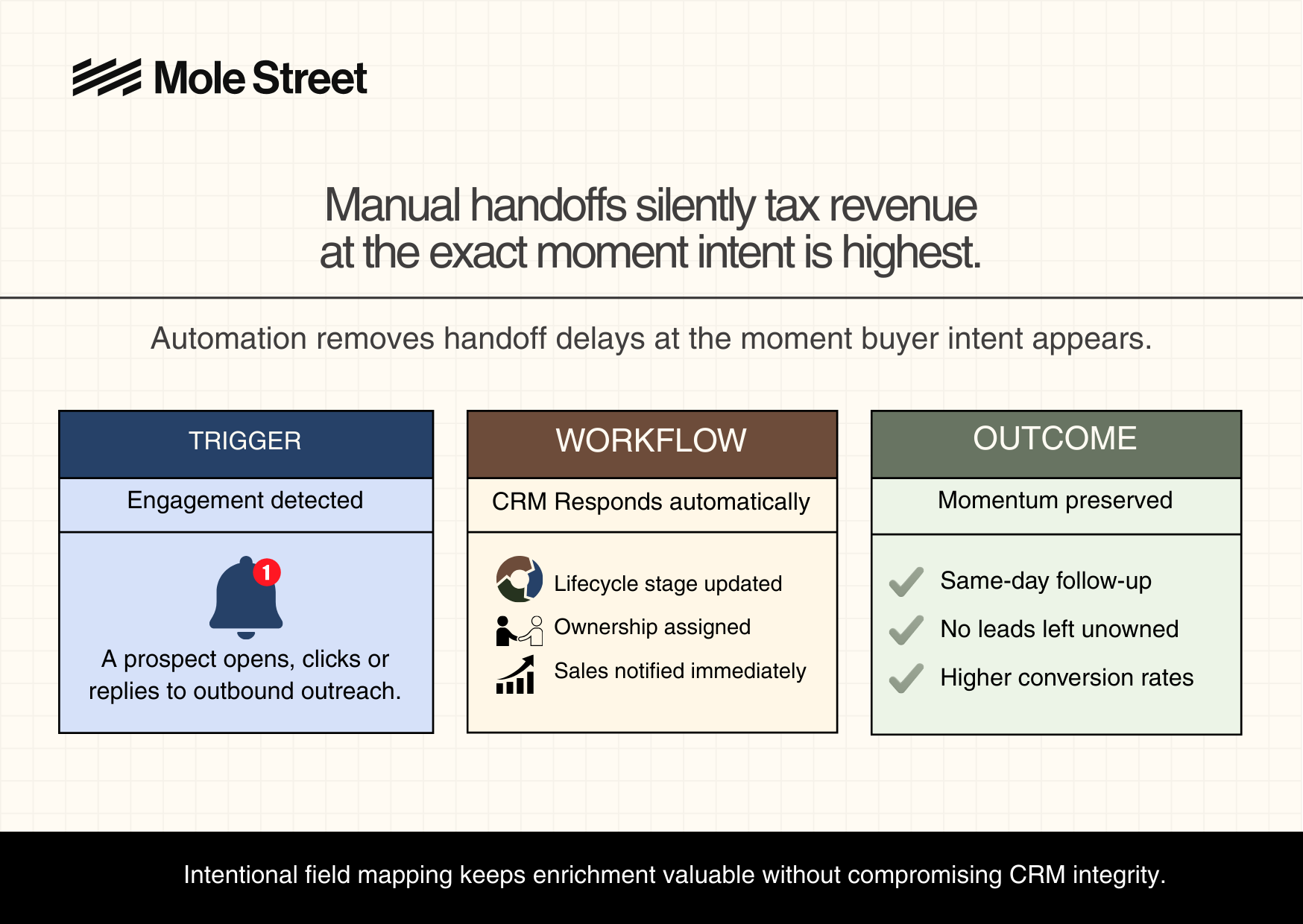
Speed and consistency in lead follow-up and handoffs matter more than sheer outbound volume. The moment a prospect engages, GTM teams must respond immediately and continue the conversation to facilitate their progression through the funnel.
Here’s a scenario we see constantly. An Apollo sequence sends 50 outbound emails. Five prospects respond with genuine interest. In Apollo, those contacts are marked as engaged. But in HubSpot, they’re still labeled as generic “Leads” with no owner assigned. Sales isn’t notified. No follow-up is triggered. The leads sit in limbo for three days and the opportunity goes cold.
High-performing teams eliminate this gap with simple automation.
Momentum is everything in lead generation, and an automation like this ensures the GTM engine keeps moving without friction or delay.
Want context on how HubSpot can enhance lead generation in a niche? Read our blog article: HubSpot Lead Generation for Financial Advisors: Build Trust and Win the Right Clients
4. Enable Attribution That Reflects the Full Buyer Journey
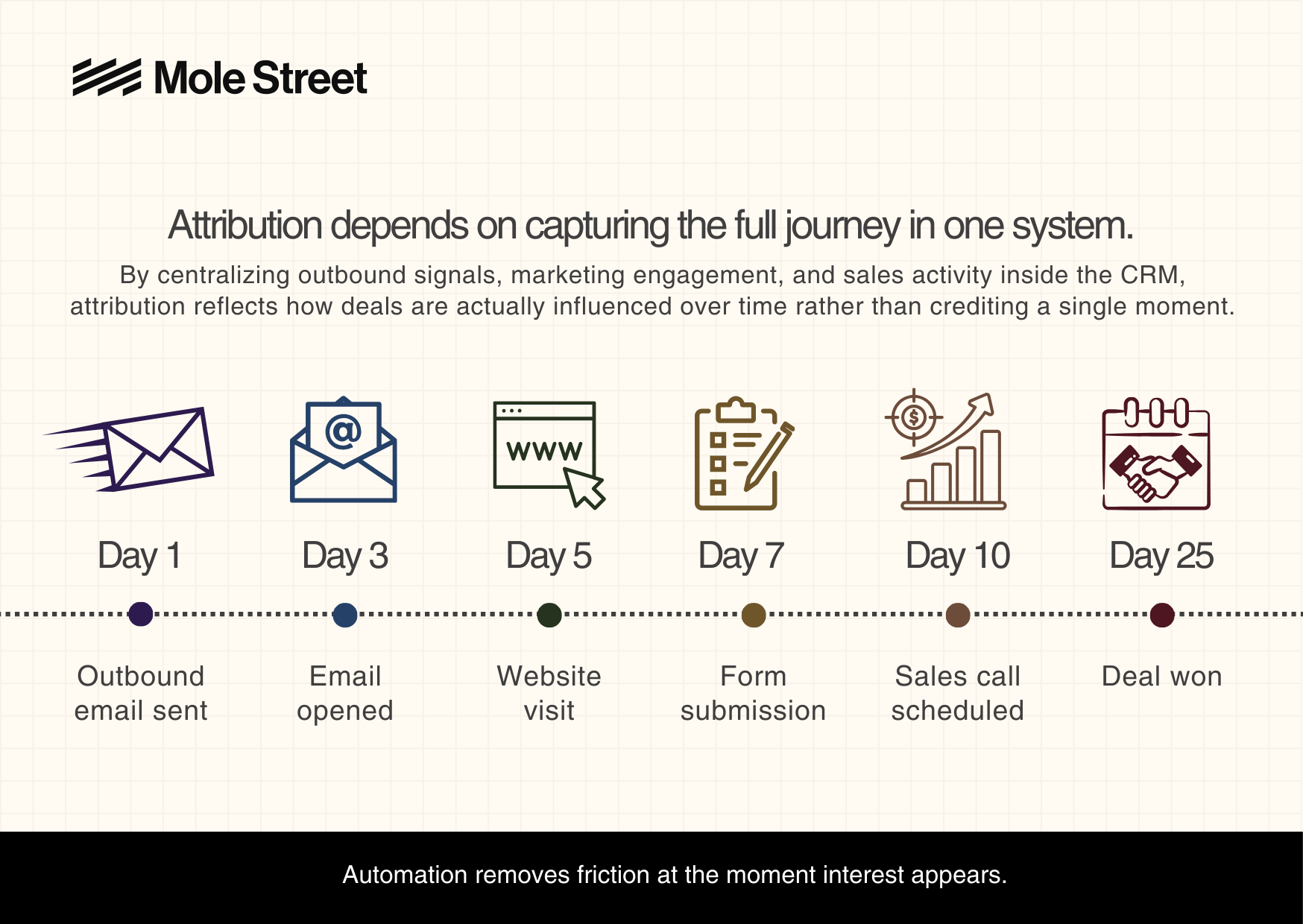
Attribution only works when every touchpoint lives in one system. HubSpot’s attribution reporting relies on lifecycle timestamps and activity history, which is why integrating outbound, marketing, and sales activity is critical.
When Apollo is properly integrated, outbound activity is no longer invisible. Every interaction is logged directly on the contact record in HubSpot, alongside marketing and sales activity.
What gets captured in HubSpot
Outbound (Apollo)
- Apollo sequence email sent
- Apollo email opened
- Apollo reply received
Marketing (HubSpot)
- Workflow and nurture emails
- Form submissions
- Website visits
Sales
- Meetings booked
- Calls logged
- Deals created and updated
With all of this activity captured in one place, HubSpot can accurately reconstruct how a deal was influenced over time, not just where it originated.
What it looks like in practice
Attribution now tells a complete story. Apollo created initial awareness, marketing content nurtured interest, and sales closed the deal. Instead of debating which channel “gets credit,” teams can see how each touchpoint contributed.
5. Use Reporting as a Feedback Loop, Not a Scorecard
With clean data and consistent lifecycle logic, HubSpot reporting stops being a scoreboard and starts becoming a diagnostic tool. High-performing teams don’t use dashboards to explain past performance: they use them to decide what to do next.
Instead of asking “Did we hit the number?”, they ask:
- Where are prospects stalling?
- Which segments convert best?
- Which channels actually influence revenue?
What this looks like in practice
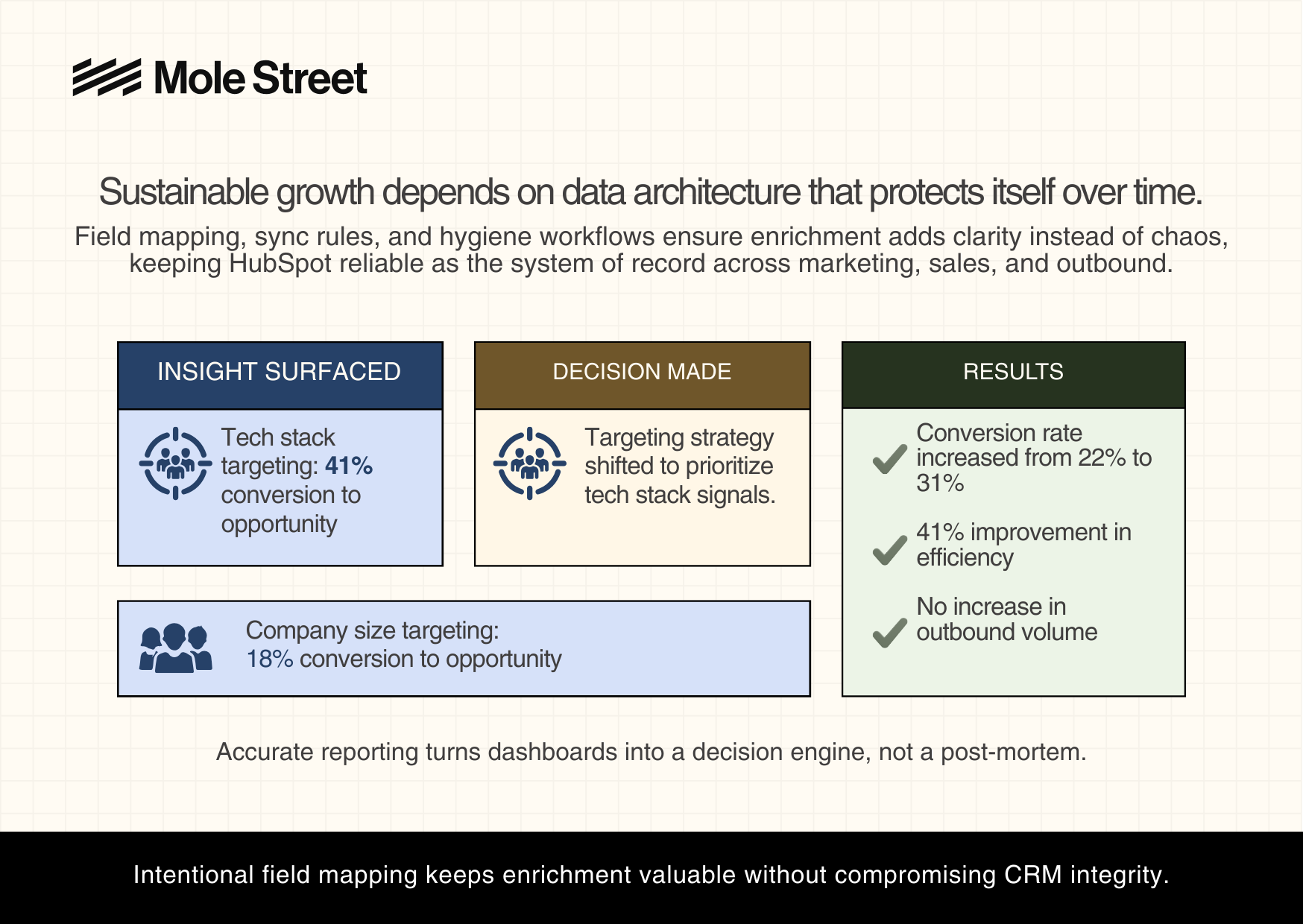
A B2B SaaS company spent three weeks setting up a connected GTM system across Apollo and HubSpot. Within the first month, reporting surfaced a clear insight:
- Tech Stack targeting: 41% conversion to opportunity
- Company Size targeting: 18% conversion to opportunity
Armed with this data, the team immediately shifted their Apollo targeting to prioritize tech stack over company size.
The result
- Overall conversion rate increased from 22% → 31%
- A 41% improvement in efficiency within three months
- No increase in outbound volume — just better decisions
Go-To-Market Teams Scale When The System Is Connected
As you will have noticed, the overarching theme in this blog is the inability for GTM teams to succeed with disconnected tools. Attempting to do so is like building a house on sand - no matter how much effort you put in, weak foundations leave you exposed and unstable from the start.
You can navigate this solution by adopting HubSpot as your central connector, where outbound tools like Apollo feed cleanly into a single, unified system of record. When this happens, every aspect of your GTM activities becomes easier, faster, and above all, more effective.
Lifecycle stages reflect real buyer behavior. Attribution captures the full journey instead of fragments. Automation removes friction from handoffs. And leadership finally gains visibility into what’s driving revenue and where to invest next. When the system connect, GTM suddenly becomes a true growth driver.
Want to Speak to a Specialist? Book a Strategy Call Now.
By: Harry Maule