From Excel to CRM: How to Move Your Pipeline Without Losing Deals or Data
We live in the midst of the AI era and the technological era continues to evolve at a frightening pace. The methods of acquiring, consolidating, and analyzing data have become far more sophisticated, especially when it comes to monitoring your pipeline.
Allowing teams to track deals, forecast revenue, monitor activity, and maintain a clear, real-time view of opportunities across the entire pipeline. It’s a remarkable technological feat.
Yet many firms still monitor pipeline activity across multiple spreadsheets, exposing themselves to consequences that ultimately undermine growth. Missed opportunities. Inaccurate forecasts. Leadership relying on guesswork. These are only a few of the repercussions of failing to centralize and manage pipeline data within a CRM.
You may recognize this challenge but still hesitate to migrate your pipeline data into a CRM. The fear of losing deals, misassigning ownership, or disrupting existing records keeps many teams stuck relying on spreadsheets. It’s an understandable apprehension.
But in reality, migrating your pipeline can be done safely and systematically. In this blog, we’ll walk through a simple process for moving your opportunity data from spreadsheets into a CRM while preserving accuracy, ownership, and visibility.
Step 1: Audit Your Current Opportunity Data
Before importing anything into a CRM, you need to understand where your opportunity data is actually stored. Most firms assume their pipeline lives in a single spreadsheet, but in reality, it’s often scattered across multiple files and systems.
In most cases, important data relating to opportunities exists across several spreadsheets, including:
Taking the time to do this upfront prevents confusion later and ensures the data you move into your CRM actually reflects your real pipeline.
Step 2: Standardize Your Data Fields
Every spreadsheet tends to evolve over time as data is added, updated, and modified. In many cases, different partners also track slightly different information. Before importing anything into a CRM, it’s important to define a standardized set of fields for opportunities.
Fortunately, most accounting firms only need a small number of core fields to track their pipeline effectively.
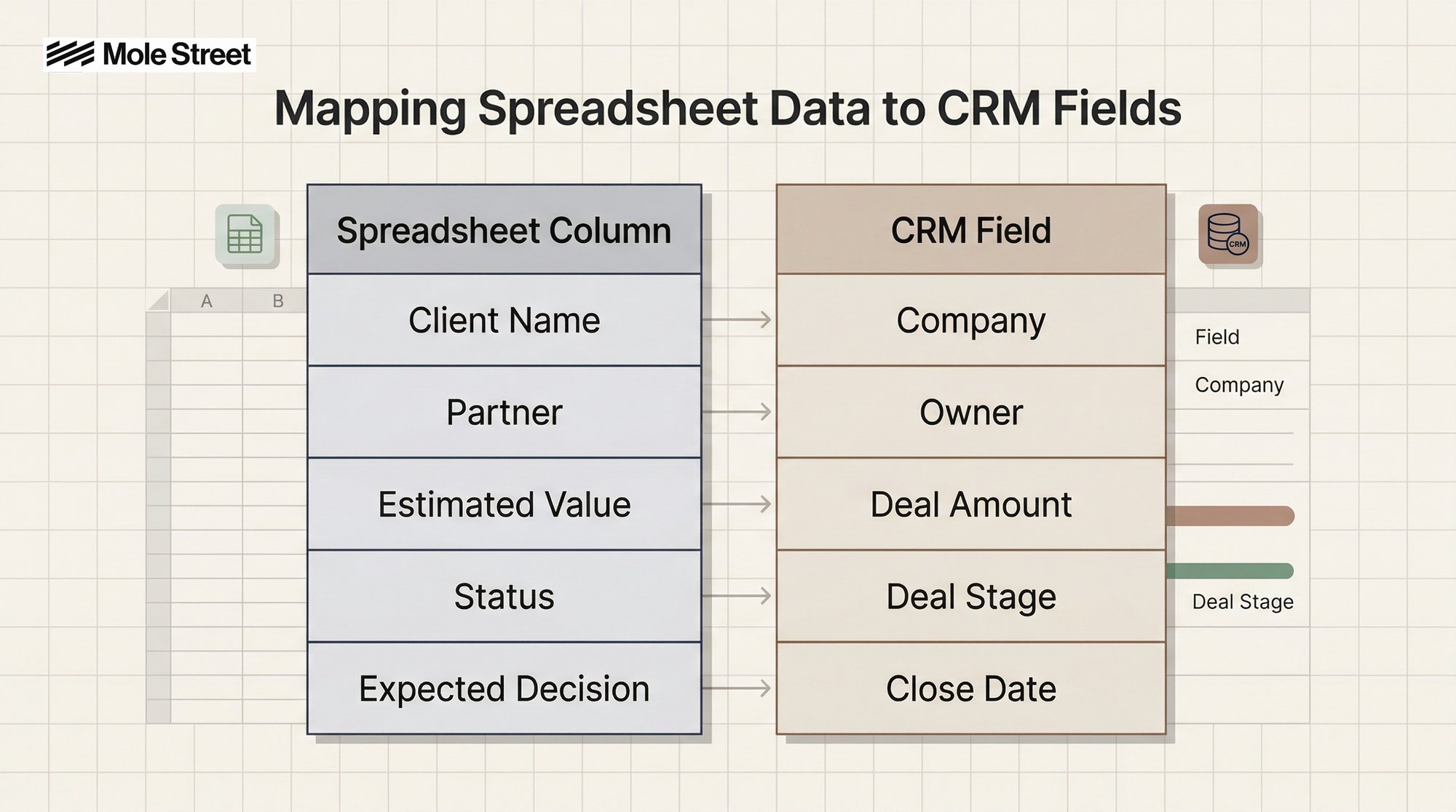
To keep everything organized, create a simple field mapping sheet that lists your existing spreadsheet columns on one side and the corresponding CRM fields on the other. For example:
Once you achieve this, your data will transfer into the CRM cleanly, with every field appearing exactly where it should.
Step 3: Clean the Data Before Importing
Data cleanliness is absolutely essential to ensure your CRM starts with accurate, reliable information. But in reality, many pipeline spreadsheets contain a myriad of inconsistencies and errors that need to be addressed before migration, such as:
- Duplicate companies
- Inconsistent stage names
- Missing values
- Text in numeric fields
- Outdated deals
Focusing on this will give your spreadsheet a strong polish and help ensure the data you migrate into your CRM is clean, consistent, and reliable.
Remove duplicate companies
If the same organization appears multiple times under slightly different names, consolidate them.
Standardize stage names
For example, you might see stages like:
- Intro call
- Initial conversation
- Qualification
In a CRM, these should map to one standardized stage like Discovery.
Fix date and amount formats
Ensure close dates are actual date fields and deal values are numeric. This allows the CRM to generate accurate forecasts later.
Identify incomplete deals
If a row is missing the owner, stage, and amount, it probably isn’t an active opportunity. Not every historical entry needs to be migrated.
Step 4: Run a Test Import
Once you’re ready to begin an import, it will be tempting to do this entire stage in one go. Do not do this. We want to maximize the accuracy of the migration and minimize the risk of errors, which you can achieve by first running a small test import with a sample of your data.
To begin this process, first select around 20–50 deals from your spreadsheet and import them into the CRM.
Then verify:
If something looks wrong, adjust your mapping and test again. Once the sample import looks right, you can proceed with the full migration confidently. This small test helps ensure everything transfers correctly before you move the entire dataset.
Step 5: Complete the Full Import
Once the mapping and formatting are confirmed, you can import the complete dataset. Most CRM systems recommend importing in this order:
- Companies
- Contacts (if available)
- Deals / Opportunities
Importing companies first ensures that opportunities can be properly linked to the correct organization. After the deals are imported, quickly review:
- Pipeline by owner
- Total pipeline value
- Stage distribution
This is a good early signal that the data landed correctly.
Step 6: Verify Ownership with Partners
If we follow Murphy’s Law, “anything that can go wrong will go wrong,” we can assume that there is a possibility of some data being mapped incorrectly during the initial import.
At this point, you just need to run a quality check to confirm that the data has transferred correctly and appears where it should in the CRM. The best way to do this is to provide each partner with a filtered view of their opportunities and ask them to review three things:
- Deal owner
- Deal stage
- Deal value
This quick review allows each partner to confirm that their opportunities have been imported accurately and that the pipeline reflects the correct ownership and deal status.
The Transformative Impact of Having a Centralized CRM for Your Pipeline
There will probably be a whole range of emotions after completing this process. Relief? Excitement? Yes. But the most powerful feeling will likely be a newly instilled confidence in the accuracy and visibility of all your pipeline date.
You now have a bird’s eye view of every opportunity across the business and the insight needed to make better, faster decisions. Long gone are the days where you have to chase after fragmented data that is scattered across different spreadsheets.
Now you can spot patterns in deal activity, identify new revenue potential, and pinpoint exactly where opportunities are gaining or losing momentum. This is what keeps your finger on the pulse of every opportunity moving through your organization. With this level of insight, you can make smarter, data-driven decisions that propels you closer to your business, instead of floundering in fragmented data and guesswork.
It’s the modern, sophisticated way of monitoring your pipeline that will be absolutely crucial to helping your business reach your growth goals. Without it, scaling will feel like an impossible task where every forecast will be uncertain, and every decision will rely on guesswork.
By: Harry Maule